Snyk vs SonarQube: Which SAST Tool Is Right for You?
Snyk vs SonarQube compared across SAST, SCA, container scanning, developer experience, CI/CD integration, and pricing. Find out which tool fits your team.
Published:
Calling Snyk and SonarQube “both SAST tools” is technically accurate and deeply misleading - like calling a scalpel and a Swiss Army knife “both cutting tools.” These two platforms are frequently placed side by side in vendor evaluations, but the reality is that they solve fundamentally different problems. Snyk is a security-first platform built around finding and fixing vulnerabilities across your application stack. SonarQube is a code quality platform built around enforcing standards, tracking technical debt, and preventing quality degradation over time. Most teams that evaluate one against the other end up needing both.
This comparison breaks down the real snyk sonarqube difference across every dimension that matters: SAST capabilities, SCA and dependency scanning, container and IaC security, code quality and technical debt, developer experience, CI/CD integration, pricing at every team size, and - most importantly - which tool you should choose for your specific situation.
Quick verdict
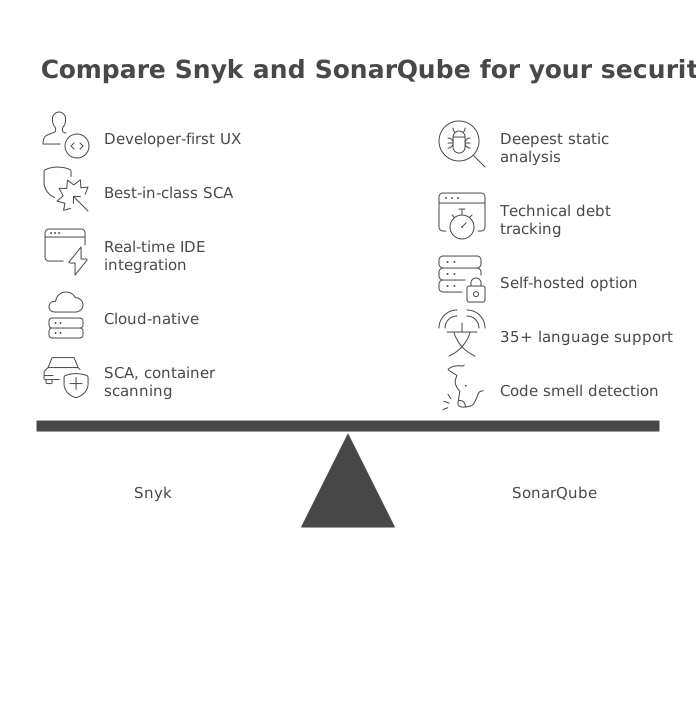
If you need to make a decision right now: choose Snyk if application security is your primary concern and you need coverage across code, dependencies, containers, and infrastructure. Choose SonarQube if code quality enforcement, technical debt tracking, and consistent coding standards are what keep you up at night. Choose both if you are serious about building software that is both secure and maintainable - and most mature engineering teams end up here eventually.
At-a-glance comparison table
| Category | Snyk | SonarQube |
|---|---|---|
| Primary focus | Application security | Code quality + security |
| SAST engine | DeepCode AI (ML-powered, 19+ languages) | Deterministic rules (6,500+ rules, 35+ languages) |
| SCA (dependency scanning) | Core strength with reachability analysis | Added in 2025 via Advanced Security add-on |
| Container scanning | Yes (Docker Hub, ECR, GCR, ACR) | No |
| IaC scanning | Yes (Terraform, CloudFormation, K8s, ARM) | Limited basic rules only |
| Code quality rules | None | 6,500+ rules (bugs, smells, complexity) |
| Technical debt tracking | None | Yes - estimated remediation time with trends |
| Quality gates | Security-focused PR checks only | Full quality gate enforcement |
| AI fix suggestions | DeepCode AI auto-fix (mature) | AI CodeFix (newer, less mature) |
| License compliance | Yes | Yes (via Advanced Security) |
| IDE integration | VS Code, JetBrains | SonarLint (VS Code, JetBrains, Eclipse, Visual Studio) |
| Deployment | Cloud only | Cloud or self-hosted |
| Free tier | 100 SAST tests/month + SCA, container, IaC | Community Build (self-hosted) or Cloud Free (50K LOC) |
| Paid starting price | $25/dev/month (Team, min 5 devs) | EUR 30/month (Cloud Team) or ~$2,500/year (Server Developer) |
| Gartner recognition | Leader in 2025 AST Magic Quadrant | Not in AST MQ (code quality category) |
What Snyk brings to the table
Snyk is a developer-first security platform used by over 4,500 organizations and recognized as a Leader in the 2025 Gartner Magic Quadrant for Application Security Testing. It was founded in 2015 and originally focused on open-source dependency scanning before expanding into a comprehensive security platform that covers five distinct product areas.
SAST via Snyk Code
Snyk Code is the SAST component, powered by the DeepCode AI engine - a hybrid of symbolic AI and machine learning trained on over 25 million data flow cases from open-source repositories. It performs interfile and data flow analysis, tracing how tainted data moves across multiple files and functions to catch complex vulnerabilities like second-order SQL injection and prototype pollution. It supports 19+ languages and generates AI-powered fix suggestions trained on curated human-made remediation patterns rather than generic LLM output. Snyk claims 6.7x faster median scan time than SonarQube for security scans.
SCA via Snyk Open Source
Snyk Open Source is the company’s original product, and dependency vulnerability scanning remains its deepest capability. The vulnerability database updates within 24 hours of new CVE disclosures. What sets it apart is reachability analysis - determining whether vulnerable code paths in your dependencies are actually called by your application. This cuts alert volume by 30-70% compared to tools that flag every known CVE regardless of whether it is reachable. Snyk also generates automatic PRs for dependency upgrades and monitors deployed dependencies for newly disclosed vulnerabilities.
Container and IaC scanning
Snyk Container analyzes Docker images for vulnerabilities in base images and installed packages, integrating with Docker Hub, Amazon ECR, Google Container Registry, and Azure Container Registry. It recommends base image upgrades and continuously monitors deployed images for newly disclosed vulnerabilities. SonarQube does not scan container images at all.
Snyk IaC scans Terraform, CloudFormation, Kubernetes manifests, and ARM templates for security misconfigurations like overly permissive IAM policies and unencrypted storage. SonarQube has basic IaC rules but nothing approaching Snyk’s dedicated product.
License compliance
Snyk includes license compliance monitoring as part of its SCA capabilities. It identifies open-source licenses across your dependency tree and flags packages with licenses that may conflict with your project’s distribution model - for example, flagging GPL-licensed dependencies in a proprietary SaaS application. Teams can define license policies that block specific license types from entering the codebase.
What SonarQube brings to the table
SonarQube is the most widely adopted static code analysis platform in the industry, used by over 7 million developers across more than 400,000 organizations. Built by SonarSource (a Swiss company founded in 2008), SonarQube has defined the category of continuous code quality inspection for over a decade.
Code quality and rule depth
SonarQube’s foundation is its deterministic rule engine with 6,500+ rules across 35+ languages. Rules cover bugs, vulnerabilities (mapped to OWASP/CWE/SANS), code smells, and security hotspots. Java alone has over 900 rules. Every rule includes documentation explaining the issue, why it matters, and compliant/non-compliant code examples. This deterministic, auditable quality means you can always trace exactly which rule triggered and understand the fix with certainty - a transparency that probabilistic AI-based tools cannot guarantee.
Quality gate enforcement
Quality gates are SonarQube’s defining feature. A quality gate defines conditions code must meet before merging - minimum coverage, maximum new bugs, duplication limits, and technical debt thresholds. When a PR fails the quality gate, SonarQube blocks the merge and shows the failing conditions directly in the PR on GitHub, GitLab, Bitbucket, or Azure DevOps. This enforcement turns code quality from a suggestion into a requirement. Snyk has security-focused PR checks but nothing equivalent to SonarQube’s broader quality gate system.
Technical debt tracking
SonarQube quantifies technical debt as an estimated remediation time - the hours it would take to fix all identified issues. This metric is tracked over time, broken down by project, module, or language, and displayed as trend charts showing whether your codebase is improving or degrading. For engineering managers who need to justify refactoring work to leadership, this data turns “we have technical debt” from a vague complaint into a concrete metric with dollar value.
Snyk does not track technical debt, code complexity, or maintainability metrics. It is entirely focused on security.
SonarLint IDE integration
SonarLint is a free IDE plugin for VS Code, JetBrains, Eclipse, and Visual Studio. In connected mode, it synchronizes your team’s quality profile from SonarQube so developers see the same rules in their editor that the CI pipeline enforces. Issues appear in real time as developers type. Snyk also has IDE plugins for VS Code and JetBrains, but SonarLint’s broader quality coverage plus connected-mode synchronization gives SonarQube the edge in IDE experience.
Security capabilities
Approximately 15% of SonarQube’s rules are security-focused, covering OWASP Top 10, CWE Top 25, and SANS Top 25. Paid editions include taint analysis and secrets detection (400+ patterns). The 2025 Advanced Security add-on brought SCA, SBOM generation, and malicious package detection for Enterprise users. These additions are meaningful but remain secondary to SonarQube’s code quality focus. Teams with serious security requirements will still need a dedicated security tool alongside SonarQube.
SAST comparison: AI-driven depth vs. deterministic breadth
The snyk vs sonarqube security comparison comes down to two fundamentally different approaches to static analysis.
Snyk’s approach is AI-driven and security-focused. The DeepCode AI engine uses machine learning trained on millions of real-world data flow patterns to understand how data moves through your application. Every finding is security-relevant - there is no noise from code style violations, complexity warnings, or maintainability suggestions. When Snyk flags something, it is a potential security vulnerability, and it comes with an AI-generated fix suggestion.
SonarQube’s approach is deterministic and comprehensive. Its rules are predefined patterns that match specific code structures. This means findings are predictable, auditable, and consistent across runs. The trade-off is that deterministic rules struggle with complex multi-file vulnerabilities where the exploit path is not a simple pattern match. SonarQube compensates with taint analysis in paid editions, but this does not reach the depth of Snyk’s ML-driven data flow analysis.
In practice: Teams that run both tools on the same codebase report approximately 30-40% overlap in security findings. Each tool catches unique issues the other misses. Snyk catches more complex data flow vulnerabilities, particularly those spanning multiple files. SonarQube catches more code-level issues like resource leaks, null pointer dereferences, and error handling problems that have security implications but are not purely security bugs.
SCA capabilities: Snyk leads by years
SCA is the area with the widest gap between the two platforms. Snyk Open Source has been refined since 2015 and represents a decade of investment in dependency vulnerability scanning. SonarQube added SCA in 2025 as part of its Advanced Security add-on.
Snyk’s SCA advantages are substantial:
- Reachability analysis that determines whether vulnerable functions are actually called by your code, reducing false positive alerts by 30-70%
- A proprietary vulnerability database with 24-hour CVE turnaround time
- Automatic pull request generation for dependency upgrades
- Continuous monitoring of deployed dependencies for newly disclosed vulnerabilities
- License compliance checking with configurable policy enforcement
SonarQube’s SCA (via Advanced Security) covers the basics - dependency scanning, malicious package detection, license compliance, and SBOM generation - but lacks reachability analysis, automatic remediation PRs, and the database speed that makes Snyk’s SCA genuinely useful in production workflows. SonarQube’s SCA is a v1 product; Snyk’s is a market leader with years of refinement.
If dependency security is a meaningful part of your requirements, Snyk’s SCA alone can justify the platform.
Developer experience comparison
Both tools emphasize developer-friendly integration, but they approach the developer experience from different angles.
Snyk is built for security in the developer workflow. The IDE plugins highlight vulnerabilities as you code. PR integrations post inline comments with vulnerability details and fix suggestions. The CLI is lightweight - snyk test runs in seconds and drops into any CI/CD pipeline with minimal configuration. The experience is fast, focused, and security-specific. Developers encounter security feedback in tools they already use rather than needing to learn a separate security console.
SonarQube is built for quality enforcement across the team. SonarLint connected mode is the standout feature - it ensures developers see the same rules in their IDE that the CI pipeline enforces, eliminating the frustrating cycle of pushing code and discovering issues after the fact. The web dashboard provides project-level and portfolio-level views that engineering leadership uses for quality tracking and reporting. PR decoration shows quality gate status, new issues, and coverage changes directly in pull requests.
Where Snyk has the better experience: Faster onboarding (minutes vs. hours for SonarQube Server), more intuitive security-focused UX, automatic dependency fix PRs, and the ability to continuously monitor deployed code.
Where SonarQube has the better experience: Broader IDE support (Eclipse and Visual Studio in addition to VS Code and JetBrains), connected-mode rule synchronization, deeper quality gate customization, and portfolio management for multi-project organizations.
CI/CD integration
Both tools integrate with all major CI/CD platforms - GitHub Actions, GitLab CI, Jenkins, Azure Pipelines, CircleCI, and others - but the integration profiles differ.
Snyk’s CI/CD integration is lightweight and modular. Install the CLI, run snyk test for SAST, snyk container test for container scanning, snyk iac test for infrastructure files. Each scan type can be configured independently with its own pass/fail criteria. Scans complete in seconds in most pipelines. The minimal overhead means Snyk rarely becomes a bottleneck in the build process.
SonarQube’s CI/CD integration requires more upfront configuration. You need a SonarQube Scanner configured in your build system, project settings defined on the server, quality profiles selected, and quality gates configured. The initial setup takes longer - typically an hour or more for SonarQube Server - but the ongoing experience is more comprehensive. Quality gates enforce a wider range of conditions than Snyk’s security-only pass/fail checks.
For teams that run both: Both tools can execute in the same CI/CD pipeline without conflict. SonarQube runs quality analysis. Snyk runs security scans. Both post results as PR checks. The PR cannot merge until both pass. This dual-check approach provides the most comprehensive automated verification possible.
Pricing breakdown
Snyk pricing
| Plan | Price | Key inclusions |
|---|---|---|
| Free | $0 | 100 SAST tests/month, 400 SCA tests, 300 IaC tests, 100 container tests |
| Team | $25/dev/month (min 5, max 10 devs) | Unlimited scans, DeepCode AI auto-fix, PR checks, Jira integration |
| Enterprise | Custom (~$670-$900/dev/year) | SSO/SAML, custom policies, compliance reporting, premium support |
SonarQube pricing
| Plan | Price | Key inclusions |
|---|---|---|
| Community Build (self-hosted) | Free | 20+ languages, basic quality gates, no branch/PR analysis |
| Cloud Free | Free | Up to 50K LOC, 30 languages, branch and PR analysis |
| Cloud Team | From EUR 30/month | Up to 100K LOC, PR decoration, quality gates on PRs |
| Developer Edition (Server) | From ~$2,500/year | 35+ languages, branch/PR analysis, secrets detection, taint analysis |
| Enterprise Edition (Server) | From ~$20,000/year | Portfolio management, security reports, COBOL/ABAP, Advanced Security |
Cost at scale
| Team size | Snyk annual cost | SonarQube annual cost | Both tools combined |
|---|---|---|---|
| 5 devs (startup) | $1,500 (Team) | Free (Cloud Free) | $1,500 |
| 20 devs (500K LOC) | $6,000 (Team) | ~$2,500 (Developer Edition) | ~$8,500 |
| 50 devs (2M LOC) | ~$33,500-$45,000 (Enterprise) | ~$10,000 (Developer Edition) | ~$43,500-$55,000 |
| 100 devs (5M LOC) | ~$67,000-$90,000 (Enterprise) | ~$35,000 (Enterprise Edition) | ~$102,000-$125,000 |
SonarQube is significantly cheaper at every team size, but the comparison is not apples-to-apples because SonarQube does not cover SCA with reachability, container scanning, or IaC scanning. The combined cost of both tools is competitive with or lower than single-vendor enterprise security platforms like Veracode or Checkmarx, while providing broader coverage than either vendor alone.
Both platforms offer multi-year contract discounts. Snyk typically offers 20-45% off for 2-3 year commitments. SonarQube Enterprise pricing is negotiable, especially for large deployments.
Vulnerability database and fix suggestions
Snyk’s vulnerability database is one of the most rapidly updated in the industry. New CVEs are typically incorporated within 24 hours of public disclosure. The database combines public vulnerability disclosures with proprietary research from Snyk’s security team, and it often identifies vulnerabilities before they receive an official CVE number. This speed matters because zero-day exploits can be weaponized within hours of disclosure.
SonarQube’s security rule set is updated with SonarQube releases rather than continuously. New vulnerability patterns are added through product updates, which means there is a longer lag between when a new vulnerability type is discovered and when SonarQube can detect it. The Advanced Security add-on improves this for dependency vulnerabilities, but the turnaround time does not match Snyk’s database refresh cadence.
Fix suggestions are another area of meaningful difference. Snyk’s DeepCode AI Fix generates remediation code trained on curated human-made fixes to vulnerable code. The suggestions are contextually relevant because they are derived from real-world remediation patterns rather than generic templates. SonarQube’s AI CodeFix is newer and produces suggestions that work well for straightforward issues but lack the contextual depth of Snyk’s approach. SonarQube’s traditional strength here is its detailed rule documentation - each of the 6,500+ rules includes compliant and non-compliant code examples that explain exactly how to fix the issue.
When to choose Snyk
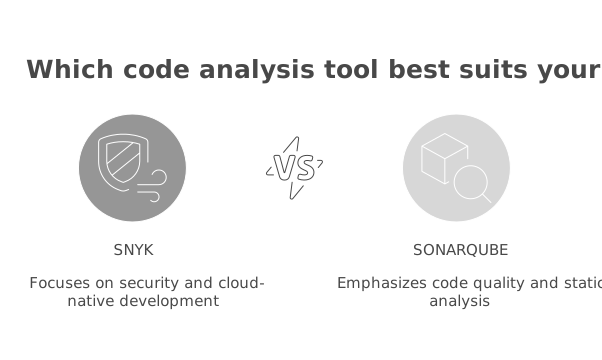
Choose Snyk as your primary platform if:
-
Security vulnerabilities are your biggest risk. Snyk’s DeepCode AI engine catches complex multi-file vulnerabilities that SonarQube’s deterministic rules miss. If you handle sensitive user data, process payments, or operate in a regulated industry where a breach has severe consequences, Snyk’s security depth is worth the investment.
-
You manage significant open-source dependencies. Applications with hundreds of npm, PyPI, Maven, or Go module dependencies benefit enormously from Snyk’s SCA with reachability analysis. The automatic remediation PRs and continuous monitoring for newly disclosed CVEs save teams hours of manual dependency management.
-
You deploy containerized workloads. Snyk Container provides unified visibility across application code and container images. SonarQube does not scan container images. For teams running Kubernetes, ECS, or other container platforms, this coverage is essential.
-
You need post-deployment monitoring. Snyk continuously monitors deployed dependencies and container images for new vulnerabilities. SonarQube only analyzes code at build time. If a new CVE is published tomorrow that affects a package already running in your production environment, Snyk will alert you. SonarQube will not.
-
Scan speed is critical for developer adoption. Snyk scans complete in seconds in CI/CD pipelines. If slower scan tools are getting disabled by frustrated developers, Snyk’s speed solves that adoption problem.
Snyk is not the right choice if code quality, technical debt tracking, or coding standards enforcement are your primary concerns. It has zero capabilities in those areas.
When to choose SonarQube
Choose SonarQube as your primary platform if:
-
Code quality and maintainability are your top priorities. No other tool matches SonarQube’s depth of quality rules (6,500+), quality gate enforcement, and technical debt tracking. If your codebase is growing increasingly difficult to maintain, SonarQube is the most effective tool for reversing that trend.
-
You need data sovereignty. SonarQube Server deploys entirely on-premises, keeping all code and analysis data within your network. Snyk is cloud-only. For organizations in government, defense, or financial services with strict data residency requirements, this is a decisive factor.
-
You want a free, self-hosted option. SonarQube Community Build is the most capable free static analysis tool available. For teams that cannot justify paid tooling, it provides genuine value across 20+ languages with quality gate enforcement.
-
You have a large multi-language or legacy codebase. SonarQube supports 35+ languages in commercial editions, including COBOL, ABAP, PL/SQL, and other legacy languages that Snyk does not cover. For organizations maintaining both modern and legacy systems, SonarQube provides unified analysis across everything.
-
Engineering leadership needs quality metrics. SonarQube’s dashboards, trend charts, and portfolio management give managers concrete data - technical debt measured in hours, quality trends over time, project-level ratings - to present to executives when justifying quality investments.
-
You are scaling AI coding assistant usage. SonarQube’s AI Code Assurance feature specifically validates AI-generated code quality, which is increasingly important as teams adopt GitHub Copilot and similar tools.
SonarQube is not the right choice if your primary concern is security vulnerabilities in dependencies, containers, or cloud infrastructure. Its security capabilities are growing but remain secondary to code quality.
Using Snyk and SonarQube together
The most effective approach for teams that can afford both tools is to run them in parallel. The overlap between Snyk and SonarQube is minimal because they focus on fundamentally different dimensions of code health.
SonarQube handles the quality baseline. Quality gates enforce minimum standards on every PR: no new bugs, no new vulnerabilities above a threshold, coverage above a percentage, duplication below a percentage. SonarLint catches issues in the IDE before code is committed. Technical debt is tracked and reported over time.
Snyk handles security depth. While SonarQube catches basic security issues, Snyk provides deeper vulnerability detection through AI-powered data flow analysis, mature SCA with reachability, container image scanning, IaC security, and continuous post-deployment monitoring.
A typical dual-tool workflow:
- Developer writes code. SonarLint catches quality issues and basic security problems in the IDE. Snyk IDE plugin flags security vulnerabilities in real time.
- Developer opens a PR. SonarQube runs quality analysis and enforces the quality gate. Snyk runs security scans across code, dependencies, containers, and IaC.
- Both tools post results as PR checks. The PR cannot merge until both pass.
- Post-merge, Snyk continuously monitors dependencies and container images for newly disclosed CVEs.
- Engineering leadership uses SonarQube dashboards for technical debt trends and Snyk dashboards for security posture.
The combined cost of both tools at enterprise scale ($102,000-$125,000 for 100 developers) is competitive with single-vendor platforms like Veracode or Checkmarx while providing broader coverage. For teams that want AI-powered code review on top of quality and security, adding CodeRabbit or Greptile creates a best-in-class toolchain.
Scenario-based recommendations
| Scenario | Better choice | Why |
|---|---|---|
| Detecting SQL injection across multiple files | Snyk | Deeper cross-file data flow analysis |
| Enforcing minimum code coverage | SonarQube | Quality gates block PRs below threshold |
| Scanning npm/PyPI dependencies for CVEs | Snyk | Mature SCA with reachability analysis |
| Reducing code complexity and duplication | SonarQube | Complexity rules and duplication tracking |
| Scanning Docker images for vulnerabilities | Snyk | SonarQube does not scan containers |
| Blocking PRs that fail quality standards | SonarQube | Quality gate enforcement is unmatched |
| Terraform/CloudFormation misconfiguration | Snyk | Dedicated IaC scanning product |
| AI-powered vulnerability remediation | Snyk | DeepCode AI auto-fix is more mature |
| Legacy language support (COBOL, ABAP) | SonarQube | Enterprise Edition covers legacy languages |
| Self-hosted/on-premises deployment | SonarQube | Snyk is cloud-only |
| Post-deployment vulnerability monitoring | Snyk | Continuous monitoring for new CVEs |
| AI-generated code validation | SonarQube | AI Code Assurance is purpose-built for this |
| Budget-constrained team | SonarQube | Free Community Build provides real value |
| License compliance for dependencies | Snyk | Built into SCA with policy enforcement |
Getting started
If you are starting from scratch: Begin with the free tiers of both tools. SonarQube Cloud Free supports up to 50K lines of code with branch and PR analysis. Snyk Free provides 100 SAST tests per month plus SCA, container, and IaC scanning. This combination costs nothing and gives you both quality enforcement and security coverage from day one.
If you are evaluating Snyk for an existing SonarQube setup: Install the Snyk CLI and IDE plugins. Run snyk test on your repositories alongside SonarQube for 2-4 weeks. Compare the security findings each tool surfaces. You will likely discover that Snyk catches dependency and container issues that SonarQube misses entirely, plus deeper code-level vulnerabilities through its AI-driven analysis.
If you are evaluating SonarQube for an existing Snyk setup: Start with SonarQube Cloud Free or the Community Build. Configure quality gates on a few key repositories. The value becomes clear within the first week as quality gate enforcement starts catching code issues - complexity, duplication, missing coverage - that Snyk does not look for.
The question is not whether to choose Snyk or SonarQube. It is which one you start with and when you add the other. For most teams, starting with SonarQube (because code quality discipline compounds over time) and adding Snyk as security requirements grow is the most practical path. But if you handle sensitive data from day one, start with Snyk and add SonarQube when maintainability becomes a concern.
Further Reading
- Codacy vs Checkmarx: Developer Code Quality vs Enterprise AppSec in 2026
- DeepSource vs Coverity: Static Analysis Platforms Compared (2026)
- Snyk vs Checkmarx: Developer Security vs Enterprise AppSec in 2026
- Snyk vs CodeQL: Free SAST Tools Compared (2026)
- Snyk vs Semgrep: SCA Platform vs Custom SAST Rules in 2026
 Gitar
GitarComments are not enough
Gitar applies the fix, validates it in CI, and clears the queue.
See it on your repo Read our independent Gitar reviewFrequently Asked Questions
Can I use Snyk and SonarQube together?
Yes, and many enterprise teams do exactly this. SonarQube handles code quality gates, technical debt tracking, and coding standards enforcement while Snyk handles security scanning across code, dependencies, containers, and infrastructure. The overlap is minimal because roughly 15% of SonarQube's rules are security-focused while Snyk's entire analysis is security-focused. Both tools post PR checks and can be required to pass before merging.
Does Snyk replace SonarQube?
No. Snyk is a security platform that finds vulnerabilities in code, dependencies, containers, and infrastructure. SonarQube is a code quality platform that enforces coding standards, tracks technical debt, and includes some security rules. They serve fundamentally different purposes and most enterprise teams use both tools together rather than replacing one with the other.
Which is better for a startup, Snyk or SonarQube?
For most startups, starting with SonarQube Cloud Free (up to 50K LOC) plus Snyk Free (100 SAST tests/month plus SCA, container, and IaC scanning) costs nothing and covers both quality and security. If you must pick one, choose SonarQube if code quality and maintainability matter more at your current stage, or choose Snyk if you handle sensitive data and security is your top priority.
Is Snyk a SAST tool?
Snyk Code is a SAST (Static Application Security Testing) product that uses the DeepCode AI engine for interfile data flow analysis across 19+ languages. Beyond SAST, the broader Snyk platform also provides SCA for dependency scanning, container image scanning, and IaC security scanning. Snyk is not a DAST tool and does not perform dynamic runtime testing.
Is SonarQube a SAST tool?
SonarQube includes SAST capabilities but is primarily a code quality platform. Approximately 15% of its 6,500+ rules are security-focused, covering OWASP Top 10 and CWE categories with taint analysis available in the Developer Edition and above. For dedicated security scanning, tools like Snyk Code, Semgrep, and Checkmarx provide deeper vulnerability detection.
How much does Snyk cost compared to SonarQube?
Snyk Team costs $25/developer/month with a minimum of 5 developers. SonarQube Cloud Team starts at EUR 30/month for up to 100K lines of code, and the self-hosted Developer Edition starts at approximately $2,500/year. Both offer free tiers. At enterprise scale, Snyk typically costs $67K-$90K/year for 100 developers while SonarQube Enterprise Edition starts around $20K/year - but Snyk covers security domains that SonarQube does not.
Explore More
Tool Reviews
 Snyk Code Review
 SonarQube Review
Free Newsletter
Stay ahead with AI dev tools
Weekly insights on AI code review, static analysis, and developer productivity. No spam, unsubscribe anytime.
Join developers getting weekly AI tool insights.
Related Articles
CodeRabbit vs Claude Code: Honest 2026 Comparison
CodeRabbit vs Claude Code compared on review depth, real cost per seat, latency, security and documented failure modes - sourced evidence, not vendor claims.
August 19, 2026
comparisonHow to Make Code Reviews Faster: 12 Proven Tactics
How to make code reviews faster: decompose PR cycle time, cut round-trips, right-size PRs, and set review SLAs - with sourced targets from Google and SmartBear.
August 19, 2026
comparisonGitar vs CodeRabbit: Fix-and-Validate or Best-in-Class Comments?
Gitar vs CodeRabbit compared on review model, CI ownership, migrations, pricing, platform support, and evaluation risk. An honest breakdown of which one fits your team.
August 12, 2026