Code Review Automation
Explore code review automation from linters and formatters to static analysis, CI/CD gates, and AI review bots. Learn what to automate vs. keep human.
19 min read
Every minute a human reviewer spends pointing out a missing semicolon or an inconsistent import order is a minute not spent on the decisions that actually require human judgment, like architecture, business logic, and design. Code review automation exists to reclaim that time. It shifts mechanical, repeatable checks from human brains to machines that execute them faster, more consistently, and without fatigue.
But automation is not a single thing. It spans a wide spectrum, from simple formatting enforcement to sophisticated AI systems that reason about code semantics. Understanding where each layer fits (and where it breaks down) is the key to building a review process that is both fast and thorough.
The Automation Spectrum
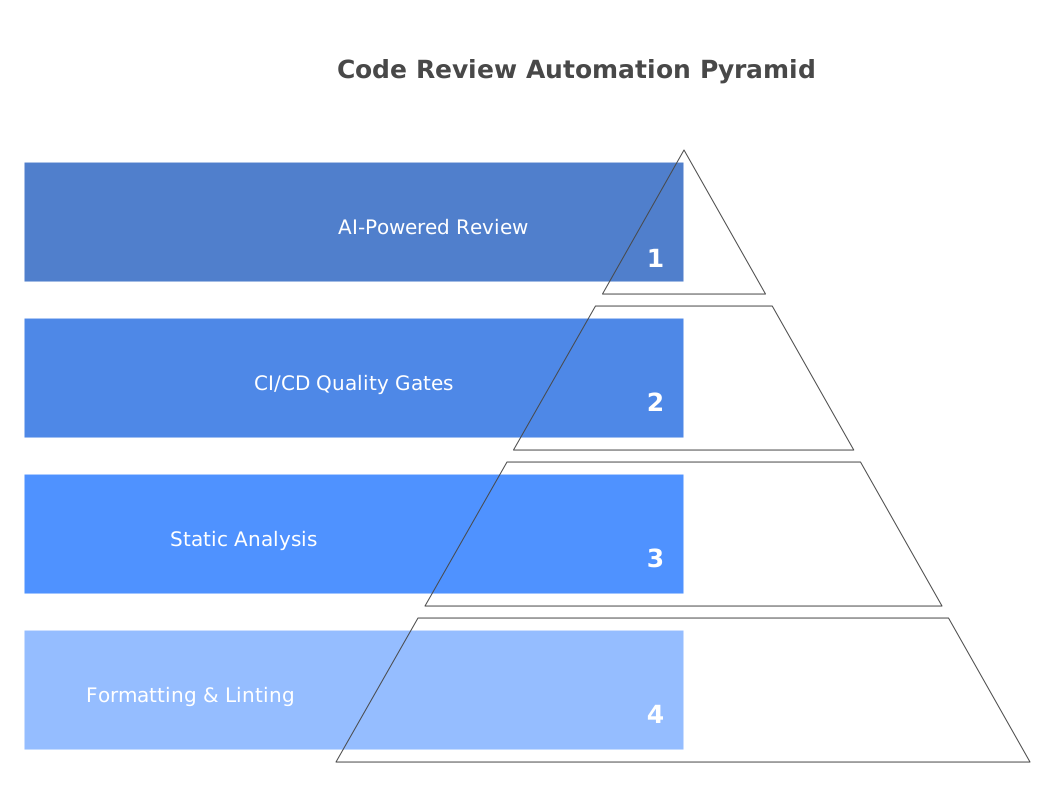
Think of code review automation as four distinct levels, each building on the one below:
- Formatting and linting, which enforces style rules and catches trivial errors
- Static analysis, which detects bugs, security vulnerabilities, and code smells through pattern matching
- CI/CD quality gates, which enforce thresholds for test coverage, build health, and PR complexity
- AI-powered review, which uses language models to analyze code semantics, intent, and design quality
Most teams start at level 1 and work their way up. The mistake is stopping too early or jumping to level 4 without laying the foundation underneath. Each layer eliminates a category of issues so the next layer (and eventually the human reviewer) can focus on progressively higher-order concerns.
The rest of this chapter walks through each level in detail, with configuration examples, tool recommendations, and practical advice for avoiding common pitfalls.
Level 1: Formatting and Linting
Formatting and linting are the lowest-hanging fruit in code review automation. They are deterministic, fast, and eliminate the single most common category of review feedback: style nitpicks.
Formatters rewrite your code to match a canonical style. There is no configuration debate because the tool makes the decision for you. The major formatters by ecosystem:
- Prettier (JavaScript, TypeScript, CSS, HTML, JSON, Markdown)
- Black (Python), famously called “the uncompromising code formatter”
- Ruff (Python), a Rust-based linter and formatter that replaces Black, isort, and dozens of Flake8 plugins at 10-100x the speed
- gofmt (Go), built into the language toolchain itself
- rustfmt (Rust), also built in and configured via
rustfmt.toml
Here is a minimal Prettier configuration that most JavaScript/TypeScript teams can adopt immediately:
// .prettierrc
{
  "semi": true,
  "singleQuote": true,
  "tabWidth": 2,
  "trailingComma": "all",
  "printWidth": 100
}
Linters go one step further. They enforce coding standards, catch common errors, and flag patterns that are technically valid but likely unintentional. Unlike formatters, linters require configuration because teams have different opinions about which rules matter.
An ESLint configuration for a TypeScript project with sensible defaults:
// .eslintrc.json
{
  "extends": [
    "eslint:recommended",
    "plugin:@typescript-eslint/recommended",
    "plugin:@typescript-eslint/recommended-type-checked"
  ],
  "rules": {
    "no-unused-vars": "off",
    "@typescript-eslint/no-unused-vars": "error",
    "@typescript-eslint/no-explicit-any": "warn",
    "@typescript-eslint/no-floating-promises": "error",
    "eqeqeq": ["error", "always"]
  }
}
For Python, Ruff has rapidly become the tool of choice. It replaces Flake8, isort, pyupgrade, and dozens of other tools with a single binary:
# pyproject.toml
[tool.ruff]
target-version = "py312"
line-length = 100

[tool.ruff.lint]
select = ["E", "F", "I", "N", "W", "UP", "S", "B", "A", "C4", "RUF"]
ignore = ["E501"]  # line length handled by formatter

[tool.ruff.format]
quote-style = "double"
The critical principle at this level: make formatters and linters run automatically, not manually. Configure them as pre-commit hooks and CI checks. Developers should never need to think about formatting. It should just happen on save in their editor and get verified in CI before a human reviewer ever sees the code.
Level 2: Static Analysis
Static analysis tools examine source code without executing it, using rules and patterns to detect bugs, security vulnerabilities, code smells, and maintainability issues that linters miss.
Where linters catch syntax-level problems (unused variables, missing semicolons), static analysis catches semantic-level problems: null pointer dereferences, SQL injection vectors, resource leaks, unreachable code, and complex coupling patterns.
The leading tools at this level:
SonarQube is the most widely deployed static analysis platform, with over 6,500 rules across 35+ languages. It tracks technical debt over time, enforces quality gates on new code, and provides a dashboard that gives engineering leadership visibility into codebase health. The Community Build is free and covers most languages, though advanced features like branch analysis and security hotspot detection require the Developer Edition ($2,500+/year). For a deep dive, read our best free code review tools roundup.
Semgrep takes a different approach. Instead of a massive rule database, Semgrep provides a lightweight pattern-matching engine that lets you write custom rules in a YAML-based DSL. It scans fast (seconds, not minutes), produces fewer false positives than most SAST tools, and its community registry includes thousands of pre-built rules for security, correctness, and best practices. Here is an example Semgrep rule that catches a common security mistake in Express.js:
rules:
  - id: express-open-redirect
    patterns:
      - pattern: res.redirect($URL)
      - pattern-not: res.redirect("/...")
    message: "Possible open redirect - validate the redirect URL against an allowlist"
    severity: WARNING
    languages: [javascript, typescript]
Codacy combines static analysis with code coverage tracking, duplication detection, and complexity metrics across 49 languages. Its free tier covers up to 5 repositories, making it accessible for small teams. Where SonarQube requires self-hosting (or paying for SonarCloud), Codacy is fully cloud-hosted from the start.
DeepSource differentiates itself with an exceptionally low false positive rate (sub-5% by their own measurement). It also includes Autofix AI, which can automatically generate patches for many of the issues it detects. For teams that have been burned by noisy static analysis tools, DeepSource’s signal-to-noise ratio is a meaningful differentiator.
The key insight at this level is that static analysis is deterministic. Given the same code and the same rules, it will always produce the same findings. This makes it reliable as a CI gate, but it also means static analysis cannot understand intent, evaluate design decisions, or catch issues that require reasoning about the broader system context. That is where levels 3 and 4 come in.
Level 3: CI/CD Quality Gates
Quality gates are automated checks that run in your CI/CD pipeline and can block a pull request from merging if certain conditions are not met. They turn quality standards from suggestions into enforced requirements.
Common quality gates that teams implement:
Test coverage thresholds. Require that new code meets a minimum coverage percentage. A common configuration is to block PRs that reduce overall coverage or that introduce new code with less than 80% line coverage. Be careful with this one, though. 100% coverage is not a goal, and coverage percentage is a poor proxy for test quality. Use it as a floor, not a ceiling.
Build verification. The PR must build successfully, all tests must pass, and type checking must complete without errors. This sounds obvious, but many teams do not enforce it strictly. A single flaky test that is allowed to fail undermines the entire quality gate system.
PR size limits. Research consistently shows that review quality degrades sharply for PRs over 400 lines changed. You can enforce this with a simple GitHub Actions check:
# .github/workflows/pr-size.yml
name: PR Size Check
on: [pull_request]

jobs:
  check-size:
    runs-on: ubuntu-latest
    steps:
      - uses: actions/checkout@v4
        with:
          fetch-depth: 0
      - name: Check PR size
        run: |
          ADDITIONS=$(gh pr view ${{ github.event.pull_request.number }} --json additions -q '.additions')
          DELETIONS=$(gh pr view ${{ github.event.pull_request.number }} --json deletions -q '.deletions')
          TOTAL=$((ADDITIONS + DELETIONS))
          if [ "$TOTAL" -gt 800 ]; then
            echo "::warning::This PR has $TOTAL lines changed. Consider splitting it into smaller PRs for better review quality."
          fi
          if [ "$TOTAL" -gt 1500 ]; then
            echo "::error::This PR has $TOTAL lines changed. PRs over 1500 lines are blocked. Please split into smaller changes."
            exit 1
          fi
        env:
          GH_TOKEN: ${{ secrets.GITHUB_TOKEN }}
Dependency vulnerability checks. Tools like Dependabot, Snyk, and Renovate can scan your dependency tree and block PRs that introduce known vulnerable packages. This is one of the highest-value automated checks you can run because dependency vulnerabilities are the single most exploited attack vector in modern software.
Secret detection. Tools like GitLeaks, TruffleHog, and GitHub’s built-in secret scanning can prevent credentials, API keys, and tokens from being committed. This should be a hard block. Once a secret is in your git history, removing it is painful and the key must be rotated regardless.
The philosophy behind quality gates is simple: automate the enforcement of standards that the team has already agreed on. If you have agreed that tests must pass before merging, make CI enforce it. If you have agreed that PRs should be small, make CI measure it. Quality gates remove the awkward social dynamic of one reviewer constantly nagging about the same standards.
Level 4: AI-Powered Review
AI-powered code review represents the newest and most rapidly evolving layer of automation. Unlike static analysis, which matches predefined patterns, AI review tools use large language models to understand code semantics, reason about intent, and generate natural-language feedback that reads like a human reviewer’s comments.
The leading tools in this category work as PR bots. They install as GitHub or GitLab apps, trigger on pull request events, analyze the diff in context, and post review comments directly on the PR.
CodeRabbit is the most widely adopted AI PR review tool, with over 2 million connected repositories. It analyzes every PR diff, posts line-by-line comments, generates a summary of changes, and can suggest fixes. It learns from your codebase over time and supports natural-language instructions to customize its focus areas.
Greptile indexes your full repository before reviewing, so its comments account for callers, conventions, and dependencies outside the diff. It attaches a confidence score to each comment, which gives teams a straightforward lever for cutting noise. It supports GitHub and GitLab.
PR-Agent by Qodo is the leading open-source option. It can be self-hosted with your own LLM API keys, which is critical for teams with strict data privacy requirements. PR-Agent supports multiple commands like /review for code review, /describe for automatic PR descriptions, /improve for code suggestions, and /test for test generation.
How do these tools actually work? The typical flow:
- A developer opens a pull request
- The AI tool receives a webhook with the PR diff
- The tool constructs a prompt containing the diff, relevant file context, repository-specific instructions, and prior conversation history
- The prompt is sent to an LLM (GPT-4, Claude, or a fine-tuned model)
- The LLM’s response is parsed and posted as inline review comments on the PR
The quality of AI review has improved dramatically since 2023. Modern tools catch null pointer risks, missing error handling, race conditions, security anti-patterns, and performance issues with reasonable accuracy. But they are not a replacement for static analysis. They complement it. Static analysis is deterministic and exhaustive within its ruleset, while AI review is probabilistic and broad. It catches issues that no one wrote a rule for, but it occasionally produces false positives. For a detailed comparison, see our guide on AI code review vs. manual review.
What to Automate vs. Keep Human
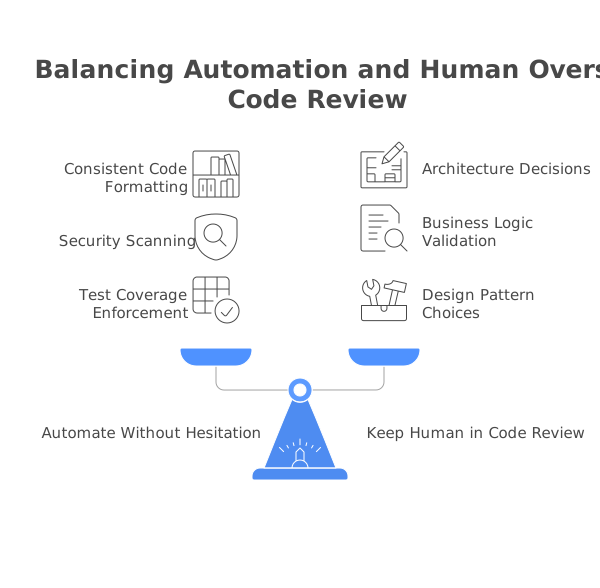
Not everything should be automated. Knowing where to draw the line is what separates teams that get value from automation from teams that drown in alert noise.
Automate these without hesitation:
- Code formatting (Prettier, Black, Ruff, gofmt)
- Linting (ESLint, Pylint, Clippy)
- Type checking (TypeScript
tsc, mypy, pyright) - Test execution and coverage measurement
- Secret detection and dependency vulnerability scanning
- Build verification
- PR description generation and change summarization
Automate with human oversight:
- Security vulnerability detection (high false positive rates in complex codebases)
- Code quality metrics and technical debt tracking
- AI-generated code suggestions and refactoring recommendations
- Performance issue detection
Keep human:
- Architecture and design decisions
- Business logic correctness (“Does this feature do what the product spec requires?”)
- API contract changes and backward compatibility evaluation
- Code review as mentorship, helping junior developers understand why, not just what
- Cross-team coordination and impact assessment
- Naming decisions for public APIs and domain concepts
- Trade-off decisions between simplicity and extensibility
The general rule: automate anything that has a clear, objective answer. Keep human anything that requires judgment, context about the business, or understanding of team dynamics.
Setting Up Your Automation Stack
Here is a practical GitHub Actions workflow that combines multiple automation layers into a single CI pipeline. This configuration covers formatting, linting, testing, and AI review for a TypeScript project:
# .github/workflows/code-review.yml
name: Automated Code Review
on:
  pull_request:
    branches: [main]

jobs:
  # Level 1: Formatting and Linting
  lint:
    runs-on: ubuntu-latest
    steps:
      - uses: actions/checkout@v4
      - uses: actions/setup-node@v4
        with:
          node-version: 22
          cache: 'npm'
      - run: npm ci
      - name: Check formatting
        run: npx prettier --check "src/**/*.{ts,tsx,js,jsx}"
      - name: Lint
        run: npx eslint "src/**/*.{ts,tsx}" --max-warnings 0
      - name: Type check
        run: npx tsc --noEmit

  # Level 2: Static Analysis
  static-analysis:
    runs-on: ubuntu-latest
    steps:
      - uses: actions/checkout@v4
      - name: Run Semgrep
        uses: semgrep/semgrep-action@v1
        with:
          config: >-
            p/typescript
            p/jwt
            p/owasp-top-ten

  # Level 3: Quality Gates
  test:
    runs-on: ubuntu-latest
    steps:
      - uses: actions/checkout@v4
      - uses: actions/setup-node@v4
        with:
          node-version: 22
          cache: 'npm'
      - run: npm ci
      - name: Run tests with coverage
        run: npx vitest run --coverage
      - name: Check coverage threshold
        run: |
          COVERAGE=$(cat coverage/coverage-summary.json | jq '.total.lines.pct')
          echo "Line coverage: $COVERAGE%"
          if (( $(echo "$COVERAGE < 80" | bc -l) )); then
            echo "::error::Coverage ($COVERAGE%) is below 80% threshold"
            exit 1
          fi

  # Secret detection
  secrets:
    runs-on: ubuntu-latest
    steps:
      - uses: actions/checkout@v4
        with:
          fetch-depth: 0
      - name: Detect secrets
        uses: gitleaks/gitleaks-action@v2
        env:
          GITHUB_TOKEN: ${{ secrets.GITHUB_TOKEN }}
For AI-powered review, install CodeRabbit or Greptile as a GitHub App. They run independently of your CI pipeline and post reviews as soon as a PR is opened. No workflow configuration is needed, and installation takes under five minutes.
If you want the open-source route, deploy PR-Agent with a GitHub Action:
# .github/workflows/pr-agent.yml
name: PR Agent
on:
  pull_request:
    types: [opened, reopened]
  issue_comment:
    types: [created]

jobs:
  pr-agent:
    runs-on: ubuntu-latest
    if: ${{ github.event_name == 'pull_request' || (github.event_name == 'issue_comment' && startsWith(github.event.comment.body, '/')) }}
    steps:
      - uses: Codiumai/pr-agent@main
        env:
          OPENAI_KEY: ${{ secrets.OPENAI_KEY }}
          GITHUB_TOKEN: ${{ secrets.GITHUB_TOKEN }}
        with:
          github_action_config.auto_review: "true"
          github_action_config.auto_describe: "true"
For a more detailed walkthrough with additional CI providers and configuration options, see our guide on how to automate code review.
Avoiding Automation Fatigue
The biggest risk with code review automation is not that it fails to catch issues. It is that it catches too many. When developers are bombarded with hundreds of automated comments per PR, they stop reading them. This is automation fatigue, and it is the silent killer of review processes.
Symptoms of automation fatigue:
- Developers dismiss automated comments without reading them
- Teams disable CI checks because they are “too noisy”
- False positive rates above 20-30% erode trust in the tooling
- New automated checks are met with resistance rather than enthusiasm
How to prevent it:
Start strict, then tune. When adopting a new tool, begin with a minimal set of rules that your team already agrees on. Add rules incrementally as the team builds confidence in the tool. Do not enable every rule on day one.
Separate blocking from advisory. Not every automated finding should prevent merging. Create two tiers: blocking checks (tests, security vulnerabilities, formatting) that must pass, and advisory checks (coverage thresholds, complexity metrics, AI suggestions) that inform but do not block. This preserves developer velocity while still surfacing useful information.
Suppress false positives aggressively. Every static analysis and AI tool supports inline suppression comments and configuration-level rule exclusions. When a finding is a confirmed false positive, suppress it immediately and add a comment explaining why. A clean signal is more valuable than comprehensive coverage.
Measure your noise ratio. Track how many automated comments are actionable versus how many are dismissed without changes. If more than 30% of automated comments are being ignored, your configuration needs tuning. DeepSource publishes a sub-5% false positive rate specifically because they understand that noise destroys trust.
Review your automation quarterly. Rules that made sense six months ago may no longer apply. New tools may handle a category better than the tool you are currently using. A quarterly review of your automation stack keeps it aligned with the team’s actual needs.
The ROI of Code Review Automation
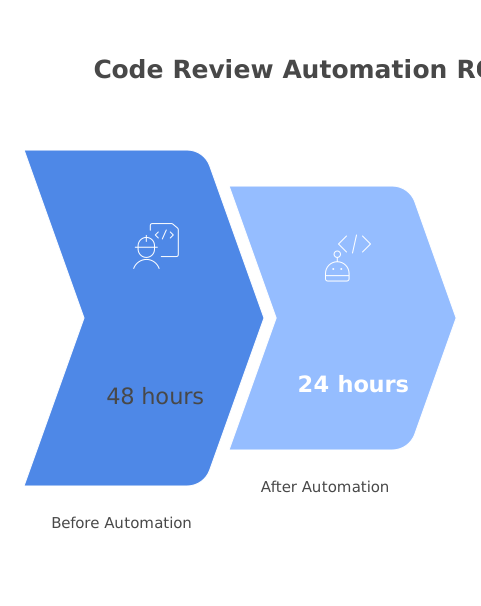
Engineering leaders often ask whether code review automation is worth the investment. The answer is almost always yes, but it helps to quantify it.
Time savings. Research from Stripe and Google suggests that senior engineers spend 15-25% of their working hours on code review. If automation handles the mechanical 60% of that review work (formatting, obvious bugs, security patterns), you recover 9-15% of senior engineering time. For a team of 10 senior engineers at a fully loaded cost of $250,000/year each, that is $225,000-$375,000 in recovered productivity annually.
Defect reduction. Static analysis and AI review catch bugs before they reach production. The industry-standard estimate is that a bug found in code review costs 10x less to fix than the same bug found in production (accounting for incident response, debugging, hotfix deployment, and customer impact). If your automation stack catches even 5 additional production-bound bugs per month, the ROI is substantial.
Consistency. Human reviewers have good days and bad days. They review the first PR of the morning more carefully than the fifth PR on a Friday afternoon. Automated checks run with the same rigor every time, providing a consistent quality baseline that human reviewers can build on.
Reviewer satisfaction. Engineers consistently report that they enjoy code review more when they can focus on design and logic rather than nitpicking style and formatting. Automation removes the least enjoyable part of review and leaves the intellectually engaging part for humans.
Speed. AI review tools provide feedback within minutes of a PR being opened. This means the author gets initial feedback while the code is still fresh in their mind, rather than context-switching back to a PR they opened two days ago. Faster feedback loops lead to faster iteration and shorter cycle times.
The tools themselves are relatively inexpensive. Most offer free tiers for open-source projects and small teams, and paid plans typically run $15-40 per developer per month. Compare that to the fully loaded cost of engineering time and the cost of production bugs, and the math is straightforward. For a comprehensive comparison, see our roundup of the best AI code review tools.
The teams that get the most from automation are the ones that treat it as a layered system: formatters at the base, linters above, static analysis in the middle, and AI review at the top, with human review as the final, highest-leverage layer. Each layer removes a class of issues so the layer above can focus on what it does best. Build your stack incrementally, tune it continuously, and never lose sight of the goal: freeing human reviewers to do the thinking that only humans can do.
Frequently Asked Questions
What parts of code review can be automated?
You can automate formatting checks (Prettier, Black), linting (ESLint, Pylint), type checking (TypeScript, mypy), security scanning (Semgrep, Snyk), test coverage enforcement, dependency vulnerability checks, and increasingly, logic and design feedback via AI tools. Keep architecture decisions, business logic validation, and mentoring as human tasks.
Should automated checks block merging?
Yes. Make critical checks (tests passing, no security vulnerabilities, linting) blocking gates in CI. Non-critical checks (coverage thresholds, style suggestions) can be advisory. This ensures a quality baseline without creating excessive friction for minor issues.
What is the difference between static analysis and AI code review?
Static analysis uses predefined rules and patterns to find bugs and code smells, so it's deterministic and consistent. AI code review uses language models to understand code context, intent, and design patterns, which means it can catch higher-level issues but may produce false positives. Modern teams use both together.
Continue Learning
 SonarQube Review
 Semgrep Review
 Codacy Review
 DeepSource Review
 Greptile Review
Newsletter
Stay ahead with AI dev tools
Weekly insights, no spam.