How to Review a Pull Request
A practical, step-by-step guide to reviewing pull requests effectively. Learn what to look for, how to prioritize feedback, and leave helpful comments.
20 min read
Before You Start: Context Is Everything
The single biggest mistake reviewers make is diving into the diff without understanding the context. Reading code line-by-line without knowing what the author was trying to accomplish is like proofreading a book without knowing its genre. You might catch typos, but you will miss the plot holes.
Before you read a single line of changed code, take five minutes to gather context:
Read the PR description. A well-written description tells you what changed, why it changed, and how to verify it works. If the description is empty or says “fixed stuff,” ask the author to fill it in. You are not obligated to review a PR that does not explain itself. (If your team struggles with PR descriptions, see our recommendations in the code review process chapter.)
Read the linked issue or ticket. If the PR references a Jira ticket, Linear issue, or GitHub issue, read it. Understanding the user story, bug report, or product requirement gives you the criteria to evaluate whether the code actually solves the problem.
Look at the file list. Before reading the diff, scan the list of changed files. How many files are touched? Which directories? Are the changes focused in one area of the codebase or scattered across many? A PR that modifies files in /src/auth/, /src/api/, and /src/database/ is likely a cross-cutting change that requires more careful review than one that modifies three files in /src/components/.
Check the size. A quick glance at the total lines changed tells you how much time to allocate. For 50-100 lines, you might finish in 10 minutes. For 300-400 lines, budget 30-45 minutes. If the PR is over 500 lines, seriously consider asking the author to split it up. Research consistently shows that review quality degrades sharply beyond 400 lines. Tools like Graphite make stacked PRs practical, so large features can be split without workflow pain.
This context-gathering phase takes five minutes and dramatically improves the quality of your review. Skip it, and you are guessing at the author’s intent throughout the entire review.
The 5-Pass Review Method
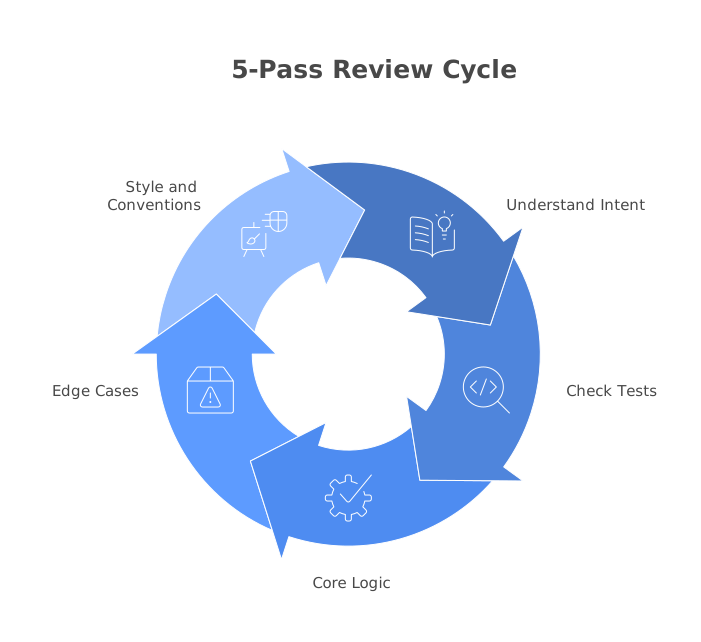
Experienced reviewers do not read a diff top-to-bottom like a book. They make multiple passes, each with a different focus. This method ensures you catch the most important issues first and do not waste time on style nitpicks when there is a security vulnerability hiding in the logic.
Pass 1: Understand the Intent
Your first pass is not about finding bugs. It is about understanding what the code is supposed to do. Skim the changed files to build a mental model of the change. Ask yourself:
- What is the core behavior being added or modified?
- What is the entry point? (A new API endpoint? A modified component? A database migration?)
- What are the supporting changes? (Test files, config changes, type definitions)
If you cannot answer these questions after your first pass, the PR either needs a better description or the code is not structured clearly enough. Either way, say so in your review.
Pass 2: Check the Tests
Read the test files next, before reading the implementation. This might seem counterintuitive, but tests are a specification. They tell you exactly what the author intends the code to do, including edge cases.
Look for:
- Coverage of the happy path. Do the tests verify that the main feature works correctly?
- Edge case coverage. What happens with empty inputs, null values, boundary conditions, or invalid data?
- Negative tests. Do the tests verify that the code fails gracefully when it should? Are error messages meaningful?
- Missing tests. Is there behavior described in the PR that is not covered by any test?
If a PR modifies business logic but includes no test changes, that is a red flag. Either the existing tests already cover the new behavior (unlikely for a significant change), or the code is going in untested.
Here is an example of a test suite that looks complete but has a critical gap:
describe('applyDiscount', () => {
  it('applies 10% discount for orders over $100', () => {
    const result = applyDiscount({ total: 150, code: 'SAVE10' });
    expect(result.total).toBe(135);
  });

  it('applies 20% discount for premium users', () => {
    const result = applyDiscount({ total: 200, code: 'PREMIUM20', isPremium: true });
    expect(result.total).toBe(160);
  });

  it('returns original total if no discount code', () => {
    const result = applyDiscount({ total: 100 });
    expect(result.total).toBe(100);
  });
});
A sharp reviewer would flag several missing test cases: What happens if both a discount code and premium status apply? Does the user get both discounts or only the highest? What happens with an invalid discount code? What happens if the total is zero or negative? These are the edge cases that cause production bugs.
Pass 3: Review the Core Logic
Now read the implementation, focusing on the core logic files, where the actual behavior change lives. Ignore supporting changes (config updates, type definitions, minor refactors) for now.
In this pass, you are asking:
- Does this code correctly implement the behavior described in the PR and tested in the tests?
- Are there logic errors, incorrect conditions, or missing branches?
- Is the error handling complete? What happens when external calls fail?
- Are there race conditions, deadlocks, or timing issues in concurrent code?
Read carefully and slowly. This is where the most important bugs hide. If you find yourself skimming, you have been reviewing too long. Take a break.
Pass 4: Edge Cases and Error Handling
On your fourth pass, actively try to break the code. Think adversarially:
- What happens if the database is down?
- What happens if the API returns a 500 instead of a 200?
- What happens with extremely large inputs? Empty inputs? Unicode characters?
- What happens if two users hit this endpoint simultaneously?
- What happens if the user is not authenticated? Not authorized?
This is often where the most valuable review feedback comes from. The author has been focused on making the happy path work. Your job is to imagine all the ways the unhappy path can go wrong.
Consider this Python function:
def get_user_profile(user_id: str) -> dict:
    response = requests.get(f"{API_URL}/users/{user_id}")
    data = response.json()
    return {
        "name": data["name"],
        "email": data["email"],
        "avatar": data["profile"]["avatar_url"]
    }
An edge-case-focused review would flag several issues:
- No error handling if the HTTP request fails (network timeout, 5xx response)
response.json()will raise an exception if the response is not valid JSON- Accessing
data["profile"]["avatar_url"]will raise aKeyErrorifprofileis missing or ifavatar_urlis not set - The
user_idis interpolated directly into the URL with no validation. Could an attacker pass a malicious value like../admin?
Pass 5: Style and Conventions
Only after you have checked correctness, tests, logic, and edge cases should you look at style issues. This is intentional. Style comments are the least important feedback, and they should never crowd out substantive concerns.
In this pass, check:
- Do names follow the team’s conventions?
- Is the code consistent with the surrounding codebase?
- Are there overly complex expressions that could be simplified?
- Are comments accurate and useful (not just restating what the code does)?
If your team has a configured linter and formatter (and you should), most style issues will be caught automatically, making this pass quick. For teams without robust linting, check out tools like SonarQube or Codacy that can automate this layer.
What to Look For
Beyond the 5-pass method, here are the specific categories of issues that experienced reviewers consistently flag.
Correctness
This is the most critical category. Does the code do what it is supposed to do?
- Logic errors: Incorrect conditionals (
>instead of>=), wrong boolean logic (&&instead of||), or incorrect loop bounds. - Off-by-one errors: Starting from 0 instead of 1, using
<instead of<=, or processing one too many or one too few items. - Null/undefined handling: Accessing properties on potentially null values without checking.
- Type mismatches: Passing a string where a number is expected, or confusing a single item with an array.
Design and Architecture
Does the change fit the system’s architecture, or does it work around it?
- Separation of concerns: Is business logic mixed into the controller? Is database access happening in the view layer?
- Abstraction level: Is the code at the right level of abstraction? A utility function that does too much or a class with too many responsibilities is a design smell.
- Extensibility: Will this approach accommodate likely future requirements, or will it need to be rewritten?
- Dependency direction: Are modules depending on the right things? Is a low-level utility importing from a high-level feature module?
Readability
Can a developer unfamiliar with this code understand it in a reasonable amount of time?
- Naming: Are variables, functions, and classes named descriptively? Does
processData()tell you what it actually processes? - Complexity: Are there deeply nested conditionals that could be flattened with early returns?
- Comments: Are there comments explaining why something is done a certain way (good) or comments explaining what the code does line-by-line (usually a sign the code is too complex)?
- Function length: A function that is 200 lines long is almost certainly doing too much.
Performance
Performance issues are worth flagging, but be careful not to prematurely optimize. Only flag performance concerns that are likely to matter at your current or near-future scale.
- N+1 queries: A database query inside a loop that could be replaced with a single batch query.
- Missing indexes: A query filtering or sorting by a column that is not indexed.
- Unnecessary work: Computing the same value multiple times, or loading data that is never used.
- Memory leaks: Event listeners that are never removed, or growing caches without eviction.
// N+1 query pattern - flag this
async function getOrdersWithProducts(userId) {
  const orders = await db.orders.findMany({ where: { userId } });
  for (const order of orders) {
    order.products = await db.products.findMany({
      where: { orderId: order.id }
    });
  }
  return orders;
}

// Better: single query with join
async function getOrdersWithProducts(userId) {
  return db.orders.findMany({
    where: { userId },
    include: { products: true }
  });
}
Security
Security issues are always blocking. Never approve a PR with a known security vulnerability, even if the author promises to fix it later.
- SQL injection: User input concatenated directly into SQL queries.
- XSS: User-generated content rendered without sanitization.
- Authentication bypass: Endpoints missing auth middleware.
- Hardcoded secrets: API keys, passwords, or tokens committed to the repository.
- Insecure deserialization: Parsing untrusted data without validation.
For a deeper treatment of security-focused review, read our article on AI code review for security.
How to Prioritize Your Feedback
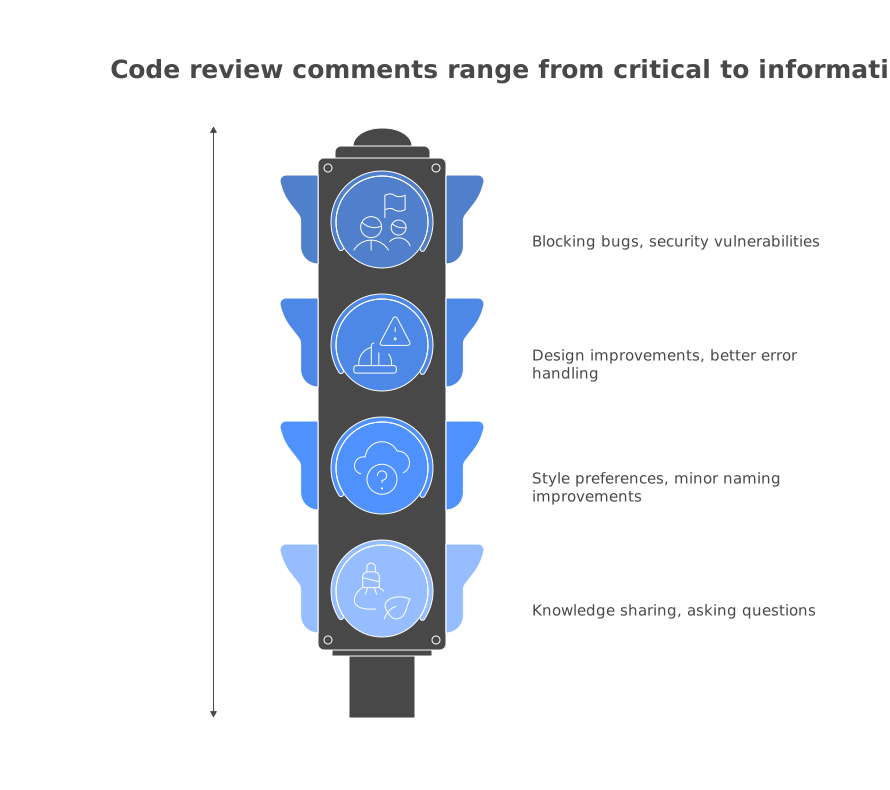
Not all feedback is equal, and dumping twenty comments on a PR without indicating priority is overwhelming for the author. Categorize your feedback explicitly:
- Must fix (blocking): Bugs, security vulnerabilities, data loss risks. The PR cannot merge until these are addressed.
- Should fix (important): Design issues, missing error handling, significant readability problems. These should be addressed in this PR unless there is a strong reason to defer.
- Could fix (suggestion): Alternative approaches, minor optimizations, naming improvements. The author can take or leave these.
- FYI (non-actionable): Observations, questions, or knowledge sharing. “This module also supports batch processing if you ever need it.”
Prefix your comments with the category. Some teams use emoji conventions (a red circle for blocking, a yellow circle for suggestions, “nit:” for minor issues). The specific system does not matter as long as the team agrees on it and uses it consistently.
Writing Effective Review Comments
The difference between a review comment that helps and one that harms often comes down to specificity and tone.
Bad Comments vs. Good Comments
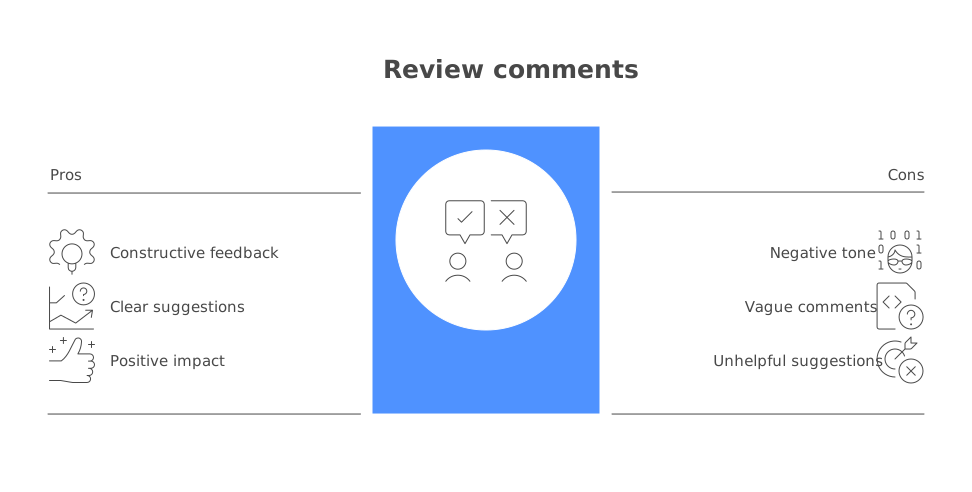
Bad: “This is wrong.”
Good: “This condition checks user.role === 'admin' but the roles are stored as an array in the database. This should be user.roles.includes('admin') to match the data model.”
Bad: “Why did you do it this way?” Good: “I see this uses a recursive approach. Have you considered an iterative approach with a stack? For deeply nested structures (which we have in the org chart feature), recursion could hit the call stack limit.”
Bad: “Refactor this.”
Good: “This function handles both validation and transformation. Extracting the validation into a separate validateOrderInput() function would make both pieces easier to test independently.”
The pattern in every good comment is the same: describe what you observe, explain why it is a problem (or why an alternative is better), and suggest a specific change. This is sometimes called the Observation-Impact-Suggestion framework:
- Observation: What you see in the code.
- Impact: Why it matters (a bug, a maintenance burden, a performance issue).
- Suggestion: A concrete change the author can make.
Ask, Do Not Command
Instead of telling the author what to do, ask questions that lead them to the same conclusion. “What happens if items is empty here?” is more effective than “Add a guard clause for empty arrays.” The question invites the author to think through the edge case themselves, which is a learning opportunity. The command just creates a task.
This matters especially when reviewing code written by developers at a similar or higher experience level. Nobody likes being given orders by a peer. But everyone is willing to think through a good question.
Handling Large Pull Requests
Sometimes you will encounter a PR with 800, 1,200, or even 3,000 lines of changes. You should not spend an entire day reviewing it, and the review quality will suffer if you try.
Here is how to handle large PRs:
1. Ask the author to split it. This is the best option. A 1,200-line PR can almost always be broken into 3-4 smaller, focused PRs that are each easier to review and safer to merge. Say something like: “This is a large change. Could you split the database migration, the service layer changes, and the API endpoint into separate PRs? I can review them individually more effectively.”
2. If splitting is not possible, review in phases. Start with the tests to understand intent. Then review the core logic files (usually the service or business logic layer). Then review the supporting changes (API routes, type definitions, config). Leave the generated files (migrations, lockfiles) for last.
3. Use AI for an initial pass. Tools like CodeRabbit and PR-Agent can analyze a large PR in minutes and flag the most likely issues. Use the AI’s findings as a guide for where to focus your human review. This does not replace your review, but it helps you triage a large diff efficiently. Learn more about this workflow in our comparison of AI code review vs. manual review.
4. Time-box ruthlessly. Do not spend more than 90 minutes reviewing a single PR in one sitting. After that, your attention drops and you start missing things. If you need more time, take a break and come back later.
When to Approve vs. Request Changes
This is a judgment call that many reviewers struggle with. The key is to distinguish between issues that must be fixed and issues you would prefer to see fixed.
Approve when:
- The code is correct and you have no blocking concerns.
- You have minor suggestions that the author can address in a follow-up PR.
- The code is not exactly how you would write it, but it is correct, clear, and maintainable. Personal preference is not a valid reason to block a PR.
Request changes when:
- There is a bug that would affect users.
- There is a security vulnerability.
- The design will create significant maintenance problems.
- Critical test coverage is missing.
- The code violates a team standard that exists for a concrete reason (not just preference).
Approve with comments (available on GitHub) when:
- You have feedback you want the author to see, but none of it is blocking. This signals that you trust the author to address minor points without needing another round of review.
A useful heuristic: if the PR shipped to production right now and you saw a bug report, would you feel the issue you are flagging was something that should have been caught in review? If yes, request changes. If no, approve and leave a suggestion.
Reviewing as a Junior Developer
If you are early in your career, being asked to review code can feel intimidating. You might think: “Who am I to review code written by someone with ten years of experience?”
Here is the truth: you bring something to the review that senior developers cannot. You have a beginner’s perspective. If you cannot understand the code, that is valuable information. It means the code might not be readable enough. Your confusion is a signal, not a weakness.
As a junior reviewer, focus on:
- Asking questions. “What does this function do?” is a legitimate review comment. If the code does not make it obvious, it probably needs a better name, a comment, or a simplification.
- Readability. If a variable name confuses you, suggest a clearer one. If you cannot follow the control flow, say so.
- Documentation. Check that the PR description explains the change. Check that public APIs have documentation. These are things anyone can evaluate regardless of experience level.
- Testing. Are there tests? Do the tests cover the cases described in the PR? You do not need to be an expert in the domain to notice that a function with four code paths has only two tests.
Do not try to pretend you understand something when you do not. A confused reviewer who stays silent is less useful than a confused reviewer who asks a question. Over time, as you review more code and see patterns, your feedback will naturally evolve from “I don’t understand this” to “This violates the single responsibility principle.” Both are valuable.
Using AI to Augment Your Reviews
AI code review tools are not a replacement for human review, but they are an increasingly powerful complement. Here is how to use them effectively as part of your review process.
Let AI handle the first pass. Tools like CodeRabbit, Greptile, and PR-Agent can scan a PR within minutes and flag potential bugs, security issues, and style violations. If the AI has already flagged a null pointer dereference, you do not need to spend time catching it yourself. You can focus your attention on the things AI is bad at: design decisions, business logic correctness, and whether the approach is the right one.
Use AI findings as a starting point, not a verdict. AI tools produce false positives. They flag things that are not actually problems, and they miss things that are. Treat AI findings as suggestions that need your judgment, not as authoritative rulings. Read each finding critically and ask whether it actually applies in this context.
Do not over-rely on AI. If a PR has been reviewed by an AI tool and flagged zero issues, that does not mean the PR is perfect. AI tools are particularly weak at evaluating design decisions, architectural fit, and business logic correctness. These are exactly the areas where human review adds the most value. The best workflow is AI for the mechanical checks, humans for the judgment calls.
For a comprehensive comparison of AI review tools, see our roundup of the best AI PR review tools, or explore individual tools like CodeRabbit and Greptile to see which fits your team’s workflow.
The ability to review pull requests effectively is one of the most valuable skills a developer can build. It makes your team’s code better, it teaches you patterns and anti-patterns you would not encounter in your own work, and it builds the trust and shared understanding that high-performing teams run on. Like any skill, it improves with deliberate practice. Apply the 5-pass method to your next review, categorize your feedback, write comments that explain the why, and pay attention to what kind of feedback your teammates find most useful. You will get better at it faster than you think.
Frequently Asked Questions
What should I look for when reviewing a pull request?
Focus on correctness (does the code do what it claims?), design (does it fit the architecture?), readability (can future developers understand it?), edge cases (what happens with unexpected input?), and security (are there vulnerabilities?). Don't focus heavily on formatting, since that should be automated with linters.
How do I review a large pull request?
Start by reading the PR description and understanding the goal. Then review the tests first to understand expected behavior. Next, look at the core logic files, then supporting changes. If the PR is too large (over 400 lines), it's reasonable to ask the author to split it into smaller, reviewable chunks.
Should I run the code locally during review?
For small changes, reading the diff is usually sufficient. For larger features, UI changes, or complex logic, running the code locally or using a preview environment can help you catch issues that aren't obvious from the diff alone.
Continue Learning
Tool Reviews
 CodeRabbit Review
 Greptile Review
 PR-Agent Review
 Graphite Review
Newsletter
Stay ahead with AI dev tools
Weekly insights, no spam.