The Code Review Checklist
A reusable code review checklist covering correctness, security, performance, readability, testing, and documentation so you never miss a critical issue.
18 min read
Why Use a Checklist?
Software engineering borrowed the concept of checklists from aviation and surgery, two fields where the cost of missing a single step can be catastrophic. In his landmark book The Checklist Manifesto, Atul Gawande documented how surgical checklists reduced deaths and major complications by more than a third at every hospital where they were introduced. The mechanism was simple: even highly skilled professionals forget things under pressure, and a checklist ensures that the obvious-but-critical steps are never skipped.
Code review has the same problem. Experienced engineers know they should check for SQL injection, verify error handling, and confirm that tests cover edge cases. But in practice, when you are reviewing the third pull request of the afternoon and a Slack notification just interrupted your train of thought, it is remarkably easy to approve a change that handles the happy path beautifully while leaving a gaping security hole in the error path.
Research from SmartBear’s study of 2,500 code reviews found that reviewers who used a checklist caught 36% more defects than those who reviewed ad hoc. The effect was most pronounced for categories that reviewers tend to deprioritize unconsciously, like security, error handling, and edge cases. Without a checklist, reviewers gravitate toward the areas they personally care about most and skip the rest.
A code review checklist does not turn review into a mechanical exercise. It is a safety net that frees you to think deeply about design and architecture because you know the fundamentals are covered. It also creates consistency across your team: when every reviewer checks the same baseline criteria, the quality floor rises for the entire codebase.
The checklist in this chapter is designed to be universal enough to apply to any codebase, specific enough to be immediately useful, and modular enough that you can customize it for your team’s particular needs. Use it as a starting point, then evolve it as your team learns what matters most for your domain.
The Universal Code Review Checklist
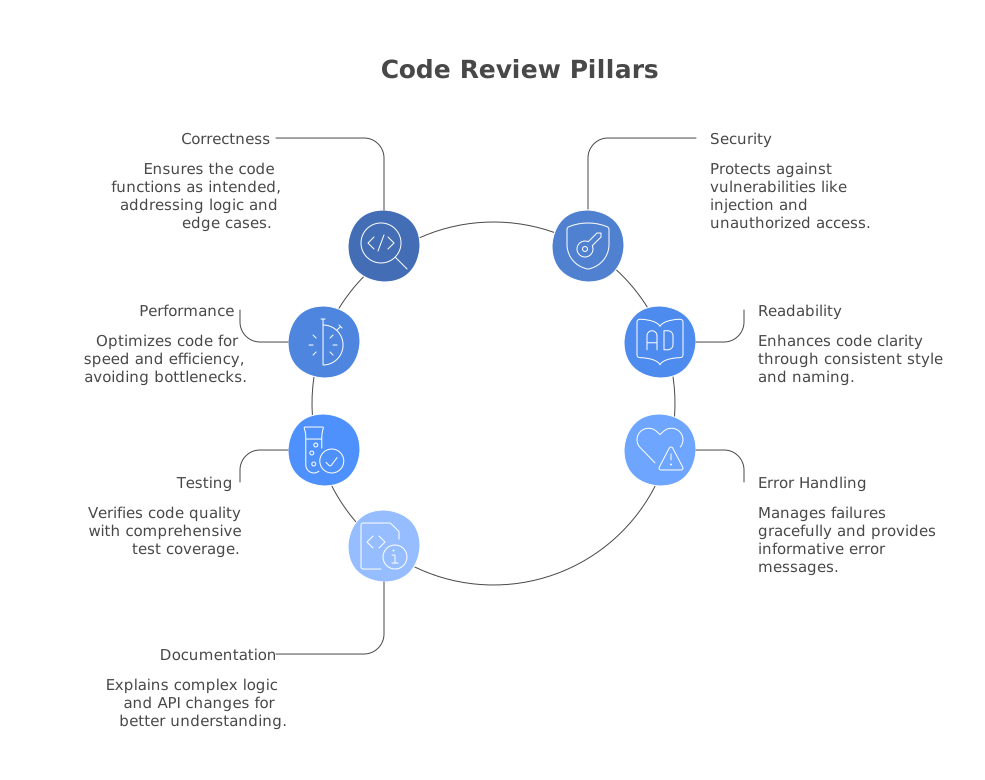
The following checklist is organized into seven categories. For each category, you will find the key questions to ask during review and guidance on what to look for. These categories are not ranked in order of importance because the right priority depends on the change type and your team’s context. A security-critical service needs heavier emphasis on the security section; a data pipeline needs more attention to performance.
Correctness
Correctness is the foundation. If the code does not do what it claims to do, nothing else matters.
- Does the code implement the stated requirements? Read the PR description, linked ticket, or spec, then verify that the implementation matches. This sounds obvious, but a surprising number of defects stem from misunderstood requirements rather than coding errors.
- Does it handle edge cases? Consider empty inputs, null values, boundary conditions, maximum sizes, and concurrent access. For numeric operations, think about overflow, underflow, and division by zero.
- Is the logic correct for all code paths? Trace through conditional branches manually. Pay special attention to early returns, nested conditions, and switch/case fallthrough.
- Are there off-by-one errors? Loop bounds, array indexing, string slicing, and pagination logic are common sources. If you see
<vs<=orlengthvslength - 1, slow down and verify. - Does the code correctly handle the data types it works with? Type coercion bugs in dynamically typed languages, integer truncation in statically typed languages, and timezone-naive datetime operations are frequent offenders.
# Easy to miss: range(1, len(items)) skips the first item
for i in range(1, len(items)):
    process(items[i])

# Correct if you want all items:
for i in range(len(items)):
    process(items[i])

# Even better: avoid index manipulation entirely
for item in items:
    process(item)
Security
Security defects are the most expensive category to miss in code review. A correctness bug might cause a user to see the wrong total on a dashboard; a security bug might expose every user’s personal data.
- Is user input validated and sanitized? Check every place where external data enters the system: HTTP request parameters, file uploads, webhook payloads, message queue bodies. Never trust data from outside your trust boundary.
- Is the code vulnerable to injection attacks? SQL injection, command injection, LDAP injection, and template injection all follow the same pattern: untrusted data is interpolated into a command string. Look for string concatenation or f-string formatting in queries and commands.
- Are authentication and authorization checks in place? Verify that the endpoint or function checks that the caller is who they claim to be (authentication) and that they are allowed to perform this action (authorization). Missing authorization checks on API endpoints are consistently in the OWASP Top 10.
- Are secrets handled properly? API keys, passwords, and tokens should never appear in source code, logs, or error messages. Check for hardcoded credentials and ensure sensitive configuration comes from environment variables or a secrets manager.
- Is sensitive data protected? Personal information should be encrypted at rest and in transit. Check that PII is not logged, that database fields containing sensitive data use appropriate encryption, and that API responses do not leak internal details.
Tools like Semgrep and Snyk Code can catch many of these patterns automatically, but they cannot reason about your application’s specific authorization model. That requires human review. For a deeper dive into how AI tools handle security scanning, see AI Code Review for Security.
Performance
Performance issues are insidious because they often do not manifest until the code is under production load.
- Are there unnecessary database queries? The N+1 query problem (where code executes one query per item in a list instead of a single batch query) is the most common performance anti-pattern in web applications.
- Is the algorithmic complexity appropriate? An O(n^2) loop might be fine for a list of 10 items but catastrophic for a list of 100,000. Consider the realistic input sizes.
- Are expensive operations cached or batched? Look for repeated computations, redundant API calls, and file system operations that could be consolidated.
- Is memory usage reasonable? Loading an entire large file into memory, creating unnecessary copies of large data structures, and accumulating results in unbounded lists are common memory issues.
- Are there potential concurrency bottlenecks? Lock contention, unbounded thread creation, and blocking operations on the main thread can all cause performance degradation under load.
// N+1 query: one query per user
const users = await db.query('SELECT * FROM users WHERE active = true');
for (const user of users) {
  const orders = await db.query('SELECT * FROM orders WHERE user_id = ?', [user.id]);
  user.orders = orders;
}

// Fixed: single query with join or batch
const usersWithOrders = await db.query(`
  SELECT u.*, o.*
  FROM users u
  LEFT JOIN orders o ON o.user_id = u.id
  WHERE u.active = true
`);
Readability
Code is read far more often than it is written. Readability directly impacts how quickly future developers (including the original author, six months later) can understand, modify, and debug the code.
- Are names descriptive and consistent? Variables, functions, classes, and files should communicate their purpose. Avoid abbreviations that are not universally understood. Follow existing naming conventions in the codebase.
- Is the code self-documenting? Well-structured code with clear names should be understandable without comments. If you need to read a comment to understand what a block of code does, the code itself might benefit from refactoring.
- Are functions and methods a reasonable size? Functions that exceed 40-50 lines often try to do too much. Look for opportunities to extract sub-functions with descriptive names.
- Is the control flow straightforward? Deeply nested conditionals, complex boolean expressions, and functions with many return points make code harder to reason about. Guard clauses and early returns can flatten nesting.
- Does the code follow existing patterns in the codebase? Consistency is more important than any individual style preference. If the codebase uses repository pattern for data access, a new feature should not introduce raw SQL queries in the controller layer.
Testing
Tests are a reviewer’s strongest signal about the author’s confidence in their code. Insufficient testing is a red flag; thoughtful testing is a green flag.
- Are there tests for the new or changed behavior? Every PR that changes application behavior should include tests that verify the change works. If it does not, ask why.
- Do the tests cover edge cases and error conditions? Happy-path-only tests provide a false sense of security. Look for tests that exercise boundary conditions, invalid inputs, and failure scenarios.
- Are the tests testing the right thing? A test that verifies implementation details rather than behavior becomes a maintenance burden. Tests should assert on outcomes, not on internal method calls.
- Are the tests readable? Test code is code too. It should be clear what each test is verifying and why. The arrange-act-assert pattern helps structure tests for readability.
- Do existing tests still pass? Check that the CI pipeline is green. If tests were modified, verify that the modifications are justified by the behavioral change, not just patched to make them pass.
Error Handling
Error handling is where the gap between demo code and production code is widest. The happy path usually works; it is the failure modes that determine whether a system is reliable.
- Are errors caught at the right level? Catching exceptions too broadly (e.g., a bare
except:in Python orcatch (Exception e)in Java) hides bugs. Catching them too narrowly means errors propagate unhandled. - Do error messages provide useful context? A message like “Error occurred” is useless for debugging. Include what operation failed, what input caused the failure, and what the caller should do about it.
- Does the code fail gracefully? When an external service is unavailable, does the system crash, hang indefinitely, or degrade gracefully with a timeout and fallback? Look for missing timeouts on network calls.
- Are resources cleaned up on failure? File handles, database connections, and locks should be released in a
finallyblock or using language-specific resource management (within Python,try-with-resourcesin Java,deferin Go). - Is the error handling consistent with the rest of the codebase? If the project uses a custom error hierarchy or a Result type, new code should follow the same patterns.
// Missing cleanup: file handle leaks on error
func processFile(path string) error {
    f, err := os.Open(path)
    if err != nil {
        return err
    }
    // If process() fails, f is never closed
    return process(f)
}

// Fixed: defer ensures cleanup
func processFile(path string) error {
    f, err := os.Open(path)
    if err != nil {
        return fmt.Errorf("opening %s: %w", path, err)
    }
    defer f.Close()
    return process(f)
}
Documentation
Documentation in the context of code review is not about writing a manual. It is about ensuring that the non-obvious aspects of the code are explained for future maintainers.
- Are complex algorithms or business rules explained? If the code implements a pricing calculation with specific rounding rules mandated by a legal requirement, that context should be captured in a comment with a link to the relevant spec.
- Are public APIs documented? Function signatures, class interfaces, and HTTP endpoints that other teams or services consume should have clear documentation of parameters, return values, error conditions, and usage examples.
- Is the PR description adequate? The PR description is documentation too. It should explain what changed, why it changed, and any relevant context that a future developer reading
git blamewould need. - Are configuration changes documented? New environment variables, feature flags, or infrastructure requirements should be documented in the relevant README or operations runbook.
- Has outdated documentation been updated? If the PR changes behavior that is described in existing documentation, the documentation should be updated in the same PR.
Checklist by Change Type
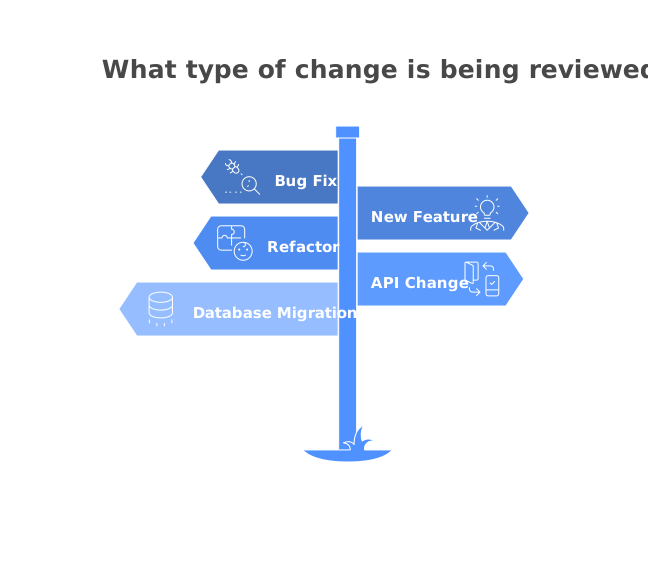
Not every change needs the same level of scrutiny in every category. Here is how to adjust your focus based on the type of change.
Bug fix. Focus heavily on correctness and testing. Verify that the root cause is addressed, not just the symptom. Demand a regression test that would have caught the original bug. Check whether the same bug pattern exists elsewhere in the codebase.
New feature. Emphasize design, readability, and testing. Is the feature structured in a way that will be maintainable as requirements evolve? Are the abstractions appropriate? Is the test coverage sufficient for a feature that has never been production-tested?
Refactor. Focus on behavioral equivalence and testing. The key question is: does the refactored code produce the same outputs for the same inputs? A refactoring PR should ideally not change any test assertions. If tests need to change, that suggests a behavioral change is mixed in with the refactor.
API change. Prioritize backward compatibility and documentation. Will existing consumers of the API break? Is there a migration path? Are the API docs updated? Check for breaking changes in request/response formats, status codes, and error structures.
Database migration. Focus on safety and reversibility. Can the migration run without locking tables or causing downtime? Is there a rollback migration? Are there data integrity checks? For large tables, consider whether the migration should be done in batches.
Automating Checklist Items
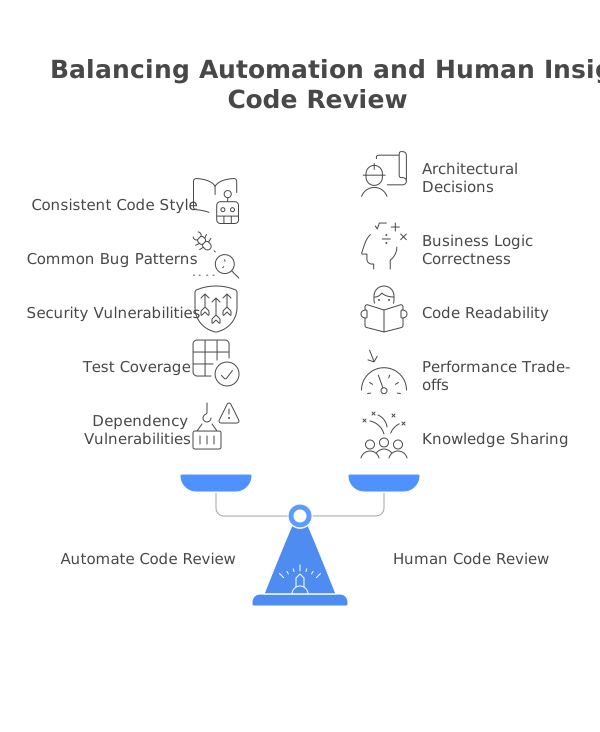
Many checklist items are mechanical enough to be automated. This is where static analysis and AI review tools provide enormous value. By automating the routine checks, you free up human reviewers to focus on design, architecture, and business logic, which are the areas where human judgment is irreplaceable.
Style and formatting. Use formatters (Prettier, Black, gofmt) and linters (ESLint, Pylint, Clippy) in your CI pipeline. These should never be discussed in human review. If code style shows up in a review comment, your tooling has a gap.
Common bug patterns. Tools like SonarQube and DeepSource detect null pointer risks, unused variables, unreachable code, and other common defects. Configure these as required CI checks so that they block merges before a human reviewer even looks at the PR.
Security vulnerabilities. Semgrep excels at pattern-based security scanning and can catch injection vulnerabilities, hardcoded secrets, and insecure configurations. Codacy provides a unified dashboard that combines security scanning with code quality metrics.
Test coverage. Code coverage tools (Istanbul, Coverage.py, JaCoCo) can be configured to fail the build if coverage drops below a threshold. While coverage percentage is a blunt metric, a significant drop in coverage on a PR that adds new functionality is a meaningful signal.
AI-powered review. Modern AI code review tools go beyond pattern matching. They can detect logical issues, suggest better algorithms, and flag architectural concerns. For an in-depth comparison of AI review tools versus manual review, see AI Code Review vs. Manual Review. For a curated list of quality tools, see Best Code Quality Tools.
The goal is not to automate everything. The goal is to automate the items that humans consistently forget or find tedious so that human review time is spent where it generates the most value.
Customizing for Your Team
The universal checklist above is a starting point. The most effective checklists are tailored to your team’s technology stack, domain, and historical pain points. Here is how to build your own.
Start with your post-mortems. Look at the last 10-20 production incidents. What categories of defect caused them? If three of your last five incidents were caused by missing input validation, that item should be at the top of your checklist and bolded.
Encode your architectural decisions. If your team has decided to use the repository pattern for data access, add a checklist item that verifies new data access code goes through a repository rather than using raw queries. If your API versioning strategy requires backward compatibility for two major versions, make that a checklist item.
Reflect your compliance requirements. Teams in regulated industries (healthcare, finance, government) often have specific requirements for logging, data retention, access control, and audit trails. These should be explicit checklist items, not things that reviewers are expected to remember.
Keep it short. A checklist with 50 items is a checklist that nobody uses. Aim for 15-20 items in your baseline checklist. If you need more, create specialized addendum checklists for specific change types (security changes, database migrations, API changes) that are used only when relevant.
Review and update the checklist quarterly. As your team fixes recurring issues and your tooling improves, remove items that are consistently caught by automation and add items that reflect new lessons learned. A living checklist is a useful checklist.
Checklist Anti-Patterns
A checklist is a tool, and like any tool, it can be misused. Watch out for these common anti-patterns.
Checkbox fatigue. If the checklist is too long or if reviewers are required to literally check every box for every PR, the checklist becomes a ritual rather than a tool. Reviewers start checking boxes without actually performing the checks. Combat this by keeping the checklist short, making it contextual (not every item applies to every PR), and trusting reviewers to exercise judgment about which items are relevant.
Rigidity over judgment. A checklist should guide attention, not replace thinking. If a reviewer flags a missing docstring on an internal helper function because “the checklist says all functions need documentation,” the checklist is being applied too rigidly. The spirit of the documentation item is to ensure complex or public interfaces are explained, not to mandate JSDoc on every utility.
Using the checklist as a weapon. “You didn’t check item 7” is not helpful feedback. The checklist exists to help reviewers, not to give them ammunition for rejecting PRs. If a checklist item is consistently missed, the response should be better tooling or better author-side guidance, not reviewer-side policing.
Never updating the checklist. A checklist that was written two years ago and never revised is likely missing important items (new security patterns, new infrastructure) and includes items that are now handled by automation. Treat the checklist as a living document that evolves with your team.
One checklist for all teams. Different teams have different contexts. The checklist for a front-end team building a design system should emphasize accessibility, browser compatibility, and visual regression testing. The checklist for a backend team building payment processing should emphasize idempotency, financial precision, and audit logging. Shared baselines are fine, but teams should own their specific extensions.
Printable Checklist Summary
Use this condensed version as a quick reference during reviews. Copy it into your team’s PR template or review tool configuration.
Correctness
- Does the code implement the stated requirements?
- Are edge cases handled (empty inputs, nulls, boundaries)?
- Is the logic correct for all code paths?
- Are there any off-by-one errors?
Security
- Is all user input validated and sanitized?
- Is the code free of injection vulnerabilities?
- Are authentication and authorization checks in place?
- Are secrets kept out of code, logs, and error messages?
Performance
- Are there any N+1 query patterns?
- Is the algorithmic complexity appropriate for realistic input sizes?
- Are expensive operations cached or batched where possible?
Readability
- Are names descriptive and consistent with codebase conventions?
- Are functions a reasonable size (under 40-50 lines)?
- Does the code follow existing patterns in the codebase?
Testing
- Are there tests for the new or changed behavior?
- Do tests cover edge cases and error conditions?
- Are tests asserting on behavior, not implementation details?
Error Handling
- Are errors caught at the appropriate level of specificity?
- Do error messages provide useful context for debugging?
- Are resources cleaned up on failure (close, defer, finally)?
Documentation
- Are complex algorithms or business rules explained?
- Are public APIs documented?
- Is the PR description clear and complete?
- Has outdated documentation been updated?
This checklist is a starting point. The best version is the one your team builds together, informed by your own production incidents, architectural decisions, and the patterns that your automated tools cannot yet catch. Pair it with code review best practices and the right set of code quality tools, and you will have a review process that consistently catches the issues that matter without slowing your team down.
Frequently Asked Questions
What should be on a code review checklist?
A good code review checklist covers: correctness (does it work?), security (any vulnerabilities?), performance (any bottlenecks?), readability (is it maintainable?), testing (adequate coverage?), error handling (graceful failures?), and documentation (are complex parts explained?). Customize it for your team's tech stack and priorities.
Should I use the same checklist for every review?
Use a common baseline checklist for all reviews, but adapt the emphasis based on the type of change. Security-sensitive changes need deeper security scrutiny, performance-critical code needs benchmarking, and API changes need backward-compatibility checks.
Can AI tools replace a code review checklist?
AI tools can automate many checklist items — especially style, common bugs, and security patterns — but they can't fully replace human judgment on design decisions, business logic correctness, and architectural fit. Use AI to handle the mechanical checks so human reviewers can focus on higher-level concerns.
Continue Learning
Tool Reviews
 SonarQube Review
 Codacy Review
 DeepSource Review
 Semgrep Review
Newsletter
Stay ahead with AI dev tools
Weekly insights, no spam.