The Code Review Process
A step-by-step breakdown of the modern code review process — from submitting a pull request to final approval, with best practices for authors and reviewers.
18 min read
The Pull Request Workflow
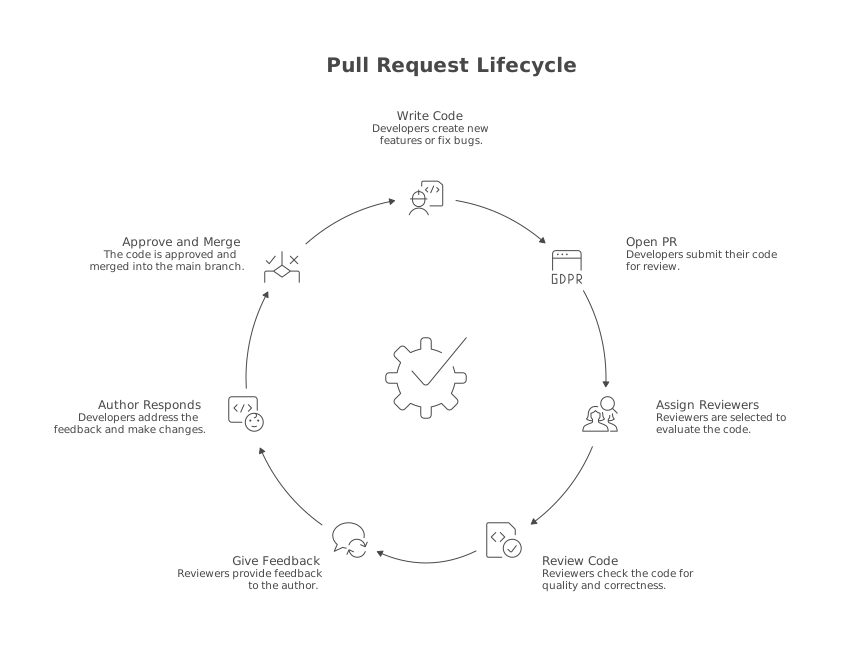
The pull request is the unit of code review in modern software development. Whether your team calls it a pull request (GitHub, Bitbucket), a merge request (GitLab), or a changelist (Google’s internal tooling), the concept is the same: a developer proposes a set of changes and asks others to review them before merging into a shared branch.
This chapter walks through each phase of the code review process in detail. Understanding this lifecycle is essential whether you are the one submitting code for review or the one reviewing it. Both roles carry responsibility, and the quality of the process depends on both sides doing their part well.
The modern code review process has seven distinct steps. Some happen in seconds, others take hours. The total cycle time (from opening a PR to merging it) is one of the most important metrics for engineering team productivity. Research consistently shows that teams with shorter review cycle times ship faster, have higher developer satisfaction, and maintain equal or better code quality. Tools like LinearB exist specifically to measure and optimize this cycle.
Let us walk through each step.
Step 1: Writing a Great PR
The quality of a code review begins long before the reviewer opens the diff. It starts with the author. A well-crafted pull request is dramatically easier to review, receives faster feedback, and results in fewer rounds of back-and-forth.
Title
The title should describe the change in a single sentence. It should be specific enough that someone scanning a list of PRs can understand what each one does without opening it.
Bad titles:
Fix bugUpdatesWIPChanges to user service
Good titles:
Fix null pointer crash when user has no payment methodAdd rate limiting to /api/auth/login endpointRefactor OrderService to use repository pattern
Description
The PR description is where you explain the why, not just the what. The diff shows what changed. The description explains why it changed, what alternatives were considered, and what the reviewer should pay attention to.
A strong PR description template includes:
## What does this PR do?
Adds rate limiting to the login endpoint to prevent brute-force attacks.
Requests are limited to 5 attempts per IP per minute using a Redis-backed
sliding window counter.

## Why?
We've seen a spike in failed login attempts from automated scripts targeting
our /api/auth/login endpoint. This change mitigates brute-force attacks
without impacting normal users.

## How to test
1. Start the local dev server with `npm run dev`
2. Send 6 POST requests to /api/auth/login within 60 seconds
3. The 6th request should return 429 Too Many Requests

## Screenshots / Logs
(if applicable)

## Related issues
Closes #1234
This description takes three minutes to write and saves the reviewer thirty minutes of guessing at context. It also creates a permanent record of the decision. Six months later, when someone asks “why do we have rate limiting on login?”, the PR description answers the question.
Size
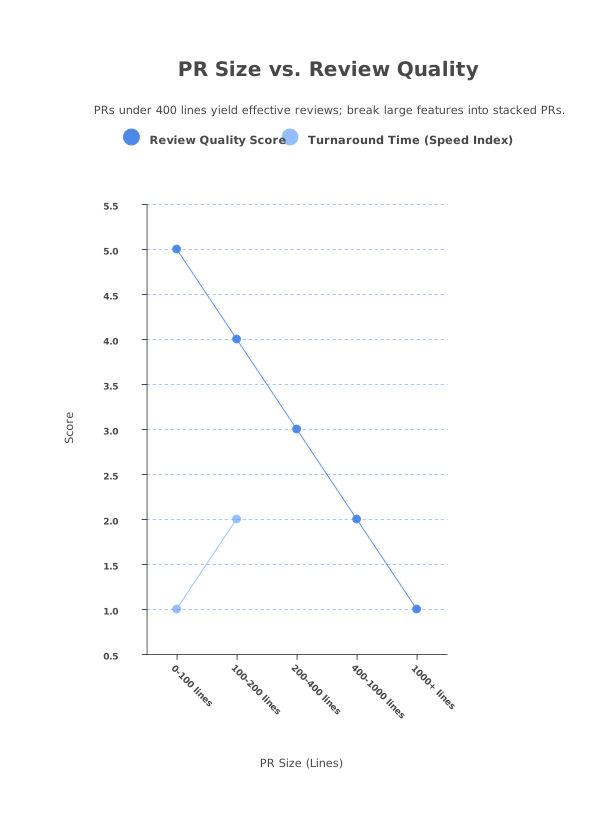
Pull request size is the single biggest predictor of review quality. Research from SmartBear, Google, and Cisco consistently shows that review effectiveness drops sharply once a PR exceeds 200-400 lines of changed code. Beyond 400 lines, reviewers start skimming instead of reading. Beyond 1,000 lines, the review becomes close to worthless.
Keep your PRs small and focused. Each PR should represent a single logical change: one feature, one bug fix, one refactor. If a feature requires 2,000 lines of code, break it into a stack of smaller, reviewable PRs that build on each other. Tools like CodeRabbit can help by providing automated first-pass reviews on each PR in the stack, making this workflow practical even for large features.
Self-Review
Before requesting a review from anyone else, review your own code. Open the diff on GitHub and read it as if you were a reviewer seeing it for the first time. You will be surprised how many issues you catch: leftover debug statements, missing error handling, unclear variable names, commented-out code you forgot to remove.
Self-review is free, takes ten minutes, and prevents the embarrassment of your reviewer pointing out a console.log("HERE") in your production code.
Step 2: Choosing Reviewers
Who reviews your code matters. The wrong reviewer wastes their time and yours. The right reviewer catches important issues, shares relevant knowledge, and approves quickly.
CODEOWNERS
Most mature teams use a CODEOWNERS file to automatically assign reviewers based on which files are changed. This way, the person who knows the affected code best is always in the review loop.
# .github/CODEOWNERS

# Backend team owns all API code
/src/api/          @backend-team

# Security team must review auth changes
/src/auth/         @security-team

# Frontend lead owns component library
/src/components/   @jane-doe

# DevOps owns CI/CD configuration
/.github/workflows/ @devops-team
/Dockerfile        @devops-team
When a PR modifies files in /src/auth/, GitHub automatically adds @security-team as a required reviewer. This eliminates the guesswork of “who should I tag?” and ensures critical code paths always get expert review.
Round-Robin and Load Balancing
In larger teams, CODEOWNERS alone can create bottlenecks. If one senior engineer owns a large portion of the codebase, they become a review bottleneck. Round-robin assignment distributes reviews evenly across team members, reducing the load on any single person.
GitHub supports round-robin assignment natively through team review assignments. Third-party tools like LinearB provide more sophisticated load balancing, factoring in each reviewer’s current review queue, availability, and expertise.
Expertise vs. Fresh Eyes
The ideal review includes two perspectives: someone who deeply understands the area of code being changed (the “expert reviewer”) and someone who does not (the “fresh eyes” reviewer). The expert catches subtle domain-specific issues. The fresh eyes reviewer catches readability problems. If they cannot understand the code, it is probably too complex.
For most PRs, one reviewer is sufficient. For high-risk changes like security-sensitive code, database migrations, and public API changes, two reviewers provide meaningful additional coverage. More than two reviewers almost never improves quality but significantly slows down the process.
Step 3: The Review Itself
You have been assigned a PR to review. Here is how to approach it effectively.
Read the Description First
Do not jump straight into the diff. Read the PR description, the linked issue, and any related design documents first. Understanding what the author is trying to do and why is essential context for evaluating how they did it.
Understand the Scope
Scan the list of changed files. How many files are changed? Which directories are affected? Is this a focused change or a wide-reaching refactor? Understanding the scope helps you allocate your time and set expectations for how long the review will take.
What to Look For
During the review itself, focus on these areas in roughly this priority order:
- Correctness. Does the code actually accomplish what the PR description claims? Are there logic errors, off-by-one mistakes, or unhandled edge cases?
- Design. Is this the right approach? Does it fit the existing architecture? Will it create problems as the system scales?
- Security. Are inputs validated? Are there injection vulnerabilities? Is authentication checked correctly?
- Readability. Can you understand the code without asking the author to explain it? Are names meaningful? Is the logic structured clearly?
- Performance. Are there obvious performance issues like N+1 queries, unnecessary memory allocations, or missing indexes?
Formatting and style issues should be caught by automated linters, not human reviewers. If your team is spending review time arguing about tabs vs. spaces or import ordering, invest in a linter configuration instead. For a comprehensive guide on how to read through code systematically, see Chapter 3: How to Review a Pull Request.
Time-Boxing
Set a time limit for your review. For a typical PR (100-300 lines), 30-45 minutes is usually sufficient. Research shows that review effectiveness drops significantly after 60-90 minutes of continuous review. If the PR is too large to review in a single sitting, that is a signal that it should be broken up, and you should tell the author that.
Step 4: Giving Feedback
How you give feedback is as important as what feedback you give. A technically correct comment delivered in a dismissive tone will be ignored or resented. A thoughtful suggestion delivered respectfully will be received and acted on. Review our code review best practices for a deeper discussion on this topic.
Comment Types
Not all comments carry the same weight. Clearly categorizing your comments helps the author prioritize their response:
Blocking comments require changes before the PR can merge. These are bugs, security vulnerabilities, or design issues that would cause real problems in production.
🔴 Bug: This query doesn't handle the case where `user.email` is null.
If a user signs up with SSO and never sets an email, this will throw
a NullPointerException on line 47. We need a null check here.
Suggestions are improvements you believe should be made, but the PR could merge without them if the author disagrees.
💡 Suggestion: Consider extracting this retry logic into a shared utility.
The same pattern exists in OrderService and PaymentService. A shared
`withRetry(fn, maxAttempts)` helper would reduce duplication.
Nitpicks are minor style or preference issues. Always prefix these with “nit:” so the author knows they can ignore them if they want.
nit: `fetchUserData` might be clearer as `getUserById` since it
only fetches a single user by ID, not a batch of data.
Questions are genuine requests for clarification, not rhetorical challenges. They are valuable for knowledge sharing and for surfacing assumptions.
❓ Question: I'm not familiar with this caching layer. Does invalidation
happen automatically when the underlying data changes, or do we need
to manually evict entries?
Tone
Write every comment as if you are talking to a respected colleague. Avoid:
- Commands: “Change this to use a map.” Instead, try “Consider using a map here, which would be O(1) for lookups instead of O(n) with the array filter.”
- Personal criticism: “You wrote this wrong.” Instead, try “This logic doesn’t handle the empty array case.”
- Sarcasm: “Did you even test this?” Instead, try “This will throw if the input is null. Could you add a test for that case?”
Remember that written communication lacks tone. What you intend as a helpful suggestion can read as a condescending demand. When in doubt, err on the side of being more explicit about your intent and more generous in your interpretation of the author’s choices.
Step 5: Responding to Feedback
The author’s responsibility does not end when they submit the PR. Responding to review feedback is an equally important part of the process.
Address every comment. Even if you disagree, respond to let the reviewer know you have seen and considered their feedback. A simple “Acknowledged, but I’m keeping this as-is because X” is better than silence.
Do not take it personally. The review is about the code, not about you. A reviewer pointing out a bug is doing you a favor. They are catching a problem before it reaches production and before your users encounter it.
Push updates, not arguments. If you agree with the feedback, make the change and push it. If you disagree, explain your reasoning concisely. If the disagreement persists, escalate to a tech lead or discuss synchronously. PR comment threads are a poor medium for long debates.
Resolve conversations. After addressing feedback, mark the conversation as resolved so the reviewer knows it has been handled. This keeps the PR clean and makes re-review faster.
Step 6: Approval and Merge
Once all reviewers have approved and all CI checks pass, the PR is ready to merge. But even at this final step, there are decisions to make.
Merge Strategies
Most Git platforms offer three merge strategies:
- Merge commit creates a merge commit that preserves the full branch history. This gives the most context but can make the main branch history noisy if branches have many small commits.
- Squash and merge combines all branch commits into a single commit on the main branch. This creates a clean history but loses the granular commit log. This is the most popular choice for teams that value a clean main branch history.
- Rebase and merge replays the branch commits on top of the main branch without creating a merge commit. This creates a linear history but can cause issues if the branch has already been shared with others.
There is no universally correct choice. Pick one as a team, document it, and be consistent.
CI Gates
Mature teams use branch protection rules to enforce quality gates before merge:
- All CI tests must pass
- At least one (or two) reviewers must approve
- All review conversations must be resolved
- The branch must be up to date with the base branch
- Code coverage must not drop below a threshold
These gates remove the temptation to merge “just this once” without proper review. They are especially important for the main branch, which should always be in a deployable state.
Optimizing Your Review Cycle Time
Review cycle time (the elapsed time from opening a PR to merging it) is one of the most important metrics for engineering productivity. Long cycle times create context switching, merge conflicts, and developer frustration. Here are proven strategies for reducing it.
Keep PRs small. A 100-line PR gets reviewed in 15 minutes. A 1,000-line PR sits in the queue for two days because no one has an uninterrupted hour to read it. Small PRs are the single most effective way to speed up your review cycle.
Set expectations for review turnaround. Many high-performing teams commit to reviewing PRs within 4 business hours. Google’s internal target is under 24 hours, and most reviews are completed within hours. Without an explicit expectation, reviews drift into “I’ll get to it when I have time,” which often means days.
Use AI for the first pass. Tools like CodeRabbit and GitHub Copilot can review a PR in under 5 minutes and catch the routine issues like missing error handling, potential null dereferences, security vulnerabilities, and style inconsistencies. By the time the human reviewer opens the PR, the mechanical issues are already flagged. This lets the human focus on design and logic, which is faster and more valuable. Read more about this approach in our guide on the best AI PR review tools.
Review in the morning. Research from Microsoft shows that reviews done in the morning are completed faster and provide higher-quality feedback than reviews done in the afternoon. This makes intuitive sense because code review requires focused attention, and attention is a finite resource that depletes throughout the day.
Batch reviews. Instead of context-switching between your own work and reviews throughout the day, set aside a dedicated 30-60 minute block for reviewing PRs. This reduces the context-switching cost and lets you get through multiple reviews efficiently.
For a deeper dive on reducing review cycle time, see our article on how to reduce code review time.
Common Process Anti-Patterns
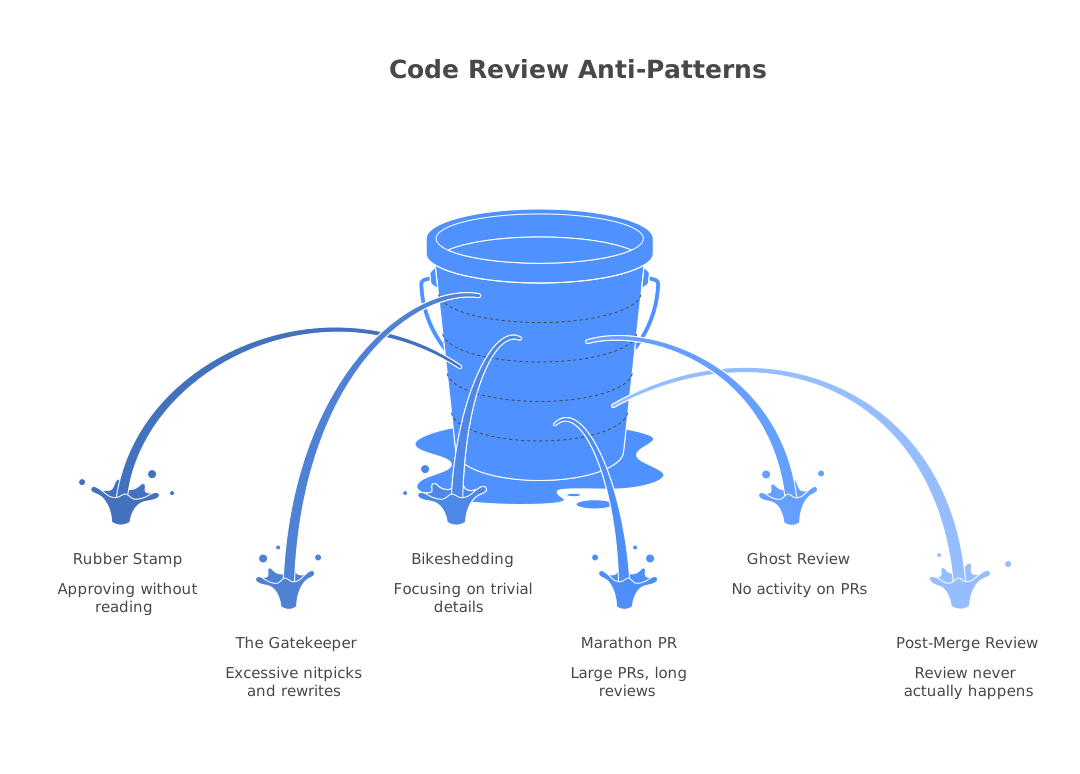
Even teams that practice code review can fall into patterns that undermine its value. Watch for these:
The Rubber Stamp. A reviewer who approves every PR within minutes without leaving any comments is not reviewing. They are performing a ritual. If a reviewer never has feedback, they are either not reading the code or the team’s bar is too low. Every PR, no matter how good, has something worth commenting on, even if it is a positive observation.
The Gatekeeper. One senior engineer who blocks every PR with extensive feedback, insisting on their preferred approach for every decision. This creates a bottleneck, demoralizes the team, and teaches developers to write code for one person’s approval rather than for clarity and correctness. Review is collaborative, not authoritarian.
The Bikeshed. Named after Parkinson’s Law of Triviality, bikeshedding is when reviewers spend twenty minutes debating variable names while ignoring a race condition in the same file. Prioritize your feedback. Catch the bugs first, suggest the renames second.
The Marathon PR. A PR with 2,000+ lines of changes that has been open for a week, collected 47 comments, and gone through four rounds of revision. By the time it merges, the author and reviewers have lost context, and the changes may conflict with other work. If a PR is not mergeable within 2-3 rounds of review, something went wrong upstream. Either the change was too large, the design was not aligned, or the requirements were unclear.
The Ghost Review. A PR that sits in the review queue for days with no activity. No comments, no approval, no rejection. Just silence. This is often a sign that the team lacks clear expectations about review turnaround time, or that the reviewer queue is overloaded. Track your review response time and hold the team accountable.
The Post-Merge Review. “I’ll review it after it’s merged” is almost always a lie. Once code is merged and deployed, the urgency to review it disappears. Post-merge reviews should be reserved for genuine emergencies, not used as a routine shortcut.
Recognizing these anti-patterns is the first step to fixing them. If your team is struggling with any of these, bring it up in a retrospective and agree on specific process changes to address it. The next chapter gets hands-on: how to review a pull request effectively.
Frequently Asked Questions
What are the steps in a code review process?
The typical code review process involves: (1) the author creates a pull request with a clear description, (2) reviewers are assigned or self-select, (3) reviewers examine the code for correctness, style, and design, (4) reviewers leave comments and request changes, (5) the author addresses feedback and pushes updates, (6) reviewers approve the changes, and (7) the code is merged into the main branch.
Who should review code?
Ideally, at least one reviewer should be familiar with the area of code being changed (a 'code owner'), and one should be less familiar to provide a fresh perspective. Senior engineers don't always need to review junior code. Peer reviews at the same level are also valuable for knowledge sharing.
How many reviewers should a pull request have?
One to two reviewers is the sweet spot for most teams. Research from Microsoft and Google shows that the first reviewer catches the majority of issues, and the second adds marginal value. More than two reviewers rarely improves quality but significantly increases cycle time.
Continue Learning
 GitHub Copilot Code Review Review
 Greptile Review
 LinearB Review
Newsletter
Stay ahead with AI dev tools
Weekly insights, no spam.